
Watch the session to understand how to engineer Snowflake efficiency instead of guessing at it.
Why Snowflake Warehouse Right Sizing Fails with Trial-and-Error
In this deep-dive technical session, Yaniv Leven, CPO of Seemore Data, breaks down a Snowflake warehouse right sizing methodology that replaces trial-and-error with algorithmic precision.
We move beyond arbitrary default settings to explore how data-driven resource allocation can align your warehouse spend with your company’s Service Level Objectives (SLOs).
The End of “Trial and Error” in Snowflake Warehouse Right Sizing
Most Snowflake teams size warehouses the same way: start with defaults, wait for complaints, then bump the size when queries slow down. While this approach feels pragmatic, it is fundamentally arbitrary.
Snowflake exposes a wide range of tunable parameters—warehouse size, concurrency, memory pressure, cache behavior—but human intuition is not well suited to reason about their combined effects. Two workloads that look identical at a high level can behave radically differently under the same configuration.
Instead of guessing, this session introduces a methodology that reconstructs your warehouse state from scratch. By replaying a real workload over a fixed time window, we simulate how each query behaves under different configurations. This allows teams to evaluate performance and cost outcomes before making any changes in production.
The Science of Vertical Scaling
A common misconception is that increasing warehouse size always increases cost. In reality, Snowflake query behavior is non-linear.
Heavy queries running on warehouses that are too small often cost more because they execute inefficiently. They suffer from low parallelism, excessive queuing, and memory pressure that forces data out of RAM. As a result, these queries run longer, consume more credits, and delay everything behind them.
Vertical scaling works when it moves a workload into its efficiency zone—the point where queries complete faster, use memory effectively, and reduce total warehouse uptime. Effective Snowflake warehouse right sizing is about finding this non-linear “sweet spot,” not minimizing size at all costs.
The session walks through how to identify that point by analyzing how performance changes as resources scale, and where additional capacity stops producing meaningful gains.
The Five Metrics That Actually Matter
Correct vertical scaling decisions rely on a small set of concrete metrics pulled directly from Snowflake telemetry. In this session, we focus on five:
-
Warehouse Size – The compute and memory resources allocated
-
Query Load Percentage – How much of the warehouse is actually utilized
-
Bytes Scanned – A critical proxy for memory pressure
-
Spillage – When queries exceed available RAM and spill to disk
-
Query Duration – The final driver of cost
Rather than evaluating these metrics in isolation, we show how to interpret them together. For example, bytes scanned on its own is not a cost metric—but when mapped to available RAM, it becomes a predictor of spillage and runaway runtimes.
Mastering Spillage: RAM vs. SSD Is Not a Small Difference
Spillage is one of the most misunderstood performance killers in Snowflake.
When a query runs out of memory, Snowflake must move intermediate data from RAM to local disk or remote storage. The performance difference between these tiers is enormous—moving from cache to RAM to SSD can mean the difference between minutes, hours, or even days of runtime.
This session explains how to translate bytes scanned into RAM pressure, and how to predict when a query will spill before it happens. By doing so, teams can determine whether scaling up memory is cost-effective or whether the workload is fundamentally disk-bound.
Understanding this boundary is critical to making rational scaling decisions.
Gen 1 vs. Gen 2: A Decision Matrix, Not a Default
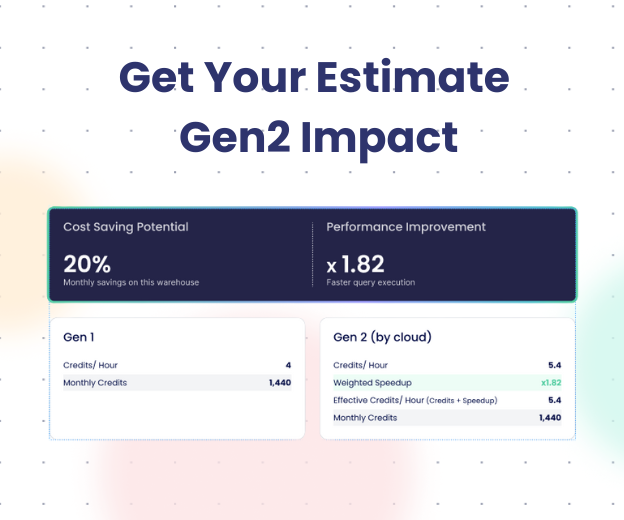
Snowflake’s Gen 2 warehouses offer stronger processing power, faster memory I/O, and double the L2 cache—but they do not improve local disk speed. As a result, they are not a universal upgrade.
We present a clear decision matrix:
-
Processing-heavy workloads benefit significantly from Gen 2
-
Storage-heavy workloads rarely do, because disk remains the bottleneck
-
Mixed workloads require a calculated ratio between in-memory processing and local disk I/O
Rather than treating Gen 2 as a blanket solution, this session shows how to evaluate whether your specific workload will actually see a performance-to-cost advantage.
Optimizing Warehouse Uptime, Not Just Queries
Snowflake charges for warehouse uptime, not individual queries. Optimizing a single query in isolation often produces misleading results.
In this session, we demonstrate how to reconstruct an entire workload timeline—looking at how queries overlap, queue, and compete for resources across time. By recalculating runtimes under different constraints, we can determine when scaling actions should occur.
This enables precise recommendations such as scaling to Extra-Large at 02:00 or switching to Gen 2 only for a specific batch window. Effective Snowflake warehouse right sizing comes from optimizing the full timeline, not chasing individual slow queries.
About the Methodology
Seemore Data replaces intuition with algorithmic precision. By calculating the ratio between processing performed in memory and I/O performed on local disk, we identify the exact tipping point where scaling up becomes cheaper than staying small.
This approach allows data teams to move from reactive tuning to engineered efficiency—making Snowflake performance and cost predictable rather than experimental.
Want to Go Deeper?
Read the full technical guide how to automate Snowflake warehouse optimization in 2026.
-> For a Smart Pulse analysis of our Snowflake warehouse – book a quick call.

Frequently Asked Questions: Snowflake Warehouse Optimization
Why is “trial and error” not enough for sizing Snowflake warehouses?
While many organizations start by setting default sizes based on rough estimates and adjusting them when performance lags, this approach is arbitrary and inefficient. Snowflake offers immense flexibility with parameters like concurrency and processing power, making manual guessing imprecise. Instead of guessing, we use algorithmic logic to look at a specific period, reconstruct the state of every query from scratch, and simulate how those workloads would behave under different resource configurations to find the mathematical optimum.
Does increasing warehouse size always increase my costs?
No, this is a common misconception. Query behavior is not linear. A heavy query running on a warehouse that is too small will run very slowly and cost significantly more than if it had been given more resources. By scaling up, you can often move a query from a high-cost, low-performance state to a state where it runs faster and cheaper. However, there is a “plateau” where adding more resources no longer improves performance; identifying this tipping point is key to optimization.
What metrics are most important for vertical scaling?
To determine the correct vertical scale (warehouse size), we analyze five specific data points extracted from Snowflake:
- Warehouse Size: The resources allocated.
- Query Load Percent: How much the query is parallelized.
- Bytes Scanned: A critical metric mapped to memory usage.
- Spillage: The primary factor impacting runtime.
- Query Duration: The final cost factor.
Why is “Spillage” such a critical factor in performance?
Spillage occurs when a query runs out of memory (RAM) and must write data to local or remote disk. The speed difference between memory tiers is drastic—moving from Cache to RAM to SSD is like moving from minutes to hours to days. If a query spills to local disk, its runtime can effectively triple. Our algorithms map “bytes scanned” to RAM Pressure to predict spillage and ensure the warehouse size keeps operations in memory whenever cost-effective.
When should I choose Gen 2 warehouses over Gen 1?
Snowflake’s Gen 2 warehouses provide stronger processing power, double the L2 cache, and faster RAM I/O, but they do not improve local disk (SSD) speeds.
- Definite Yes: Processing-heavy queries (e.g., complex calculations) will run faster and be more cost-effective.
- Definite No: Storage-heavy queries (e.g., large data writes) will usually not benefit because disk speed is the bottleneck.
- Mixed Workloads: For queries that mix memory and disk usage, we calculate a specific ratio between processing done in memory vs. local disk I/O to determine if the switch is worth it.
Do you optimize individual queries or the whole warehouse?
We optimize for the warehouse’s uptime. Since you pay for the time the warehouse is running—not just for individual queries—optimizing a single query in isolation isn’t enough. We reconstruct the entire timeline of your workload, recalculating the runtimes of all queries together under different constraints. This allows us to recommend specific schedule changes, such as scaling from Medium to Extra-Large at 2:00 AM or switching to Gen 2 for a specific batch window, to minimize total cost of ownership.