How to Automate Snowflake Warehouse Optimization (2026 Guide)

TL;DR
Snowflake warehouse optimization in 2026 requires right-sizing compute (vertical scaling), controlling concurrency with multi-cluster policies (horizontal scaling), choosing Gen1 vs Gen2 based on workload type, and eliminating idle time with aggressive suspension. Teams that move from manual tuning to continuous automation typically reduce Snowflake compute costs by up to 50%.
How to optimize your Snowflake warehouse?
Your Snowflake warehouse costs are much higher than it should be.
This guide explains practical Snowflake warehouse optimization techniques data teams can apply in 2026 to systematically reduce spend by up to 50%.
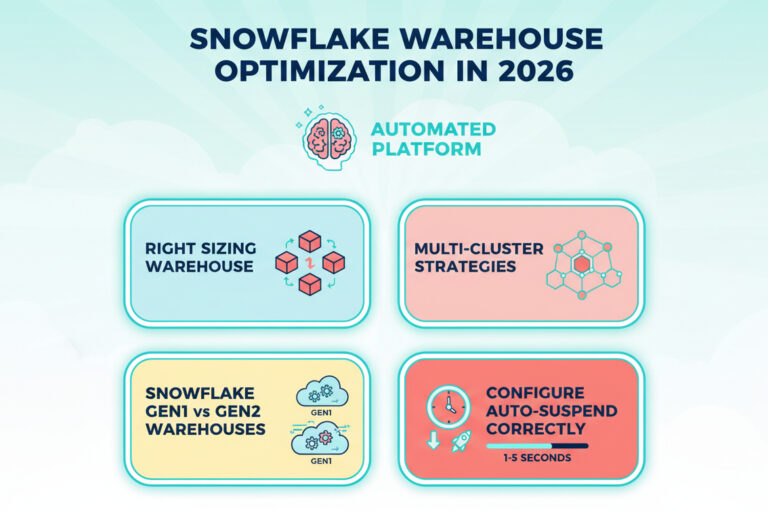
We’ll cover these steps:
- How to right-size a Snowflake warehouse (vertical scaling)
- Proven Snowflake multi-cluster strategies
- When to use Snowflake Gen2 vs Gen1 warehouses
- How to configure Snowflake auto-suspend correctly
- How to automate and continuously optimize Snowflake warehouses
1. How to right-size a Snowflake warehouse (vertical scaling)
To right-size Snowflake virtual warehouses and optimize costs, data teams usually start small, monitor utilization and spillage, and scale up only when queries hit performance limits.
The goal is not to use the smallest warehouse possible, but to use the smallest warehouse that completes queries without spilling or missing performance SLAs.
Doubling warehouse size doubles hourly cost but sometimes cuts total costs by finishing faster. An XL warehouse running a 10-minute query costs the same as Large running 20 minutes. The challenge is knowing when vertical scaling saves money versus burning more credits.
Vertical scaling decisions depend on query complexity, spillage patterns, and performance SLAs.
When scaling up a Snowflake warehouse reduces total cost
Scaling up a Snowflake warehouse often reduces total credits consumed when queries are memory-bound. Common signals include:
- Remote spillage in QUERY_HISTORY (`bytes_spilled_to_remote_storage > 0`)
- Long runtimes on joins, aggregations, or CTAS operations
- Queries that run faster but not cheaper on smaller warehouses
- SLA misses caused by memory pressure rather than CPU limits
If queries spill to remote storage, a larger warehouse often finishes faster and costs less total credits.
- Example: A Medium with heavy spillage takes 60 minutes (2 credits). A Large with no spillage takes 25 minutes (1.66 credits). Larger is faster and cheaper.
When scaling down a Snowflake warehouse saves credits
Scaling down saves money when the warehouse is consistently underutilized. Common indicators include
- Average warehouse load below 60% during active periods
- No local or remote spillage across typical queries
- CPU usage well below saturation
- Query runtimes that do not materially improve on larger sizes
If average query load stays under 60% with no spillage, you’re overpaying.
Continuous Right-Sizing with Smart Pulse
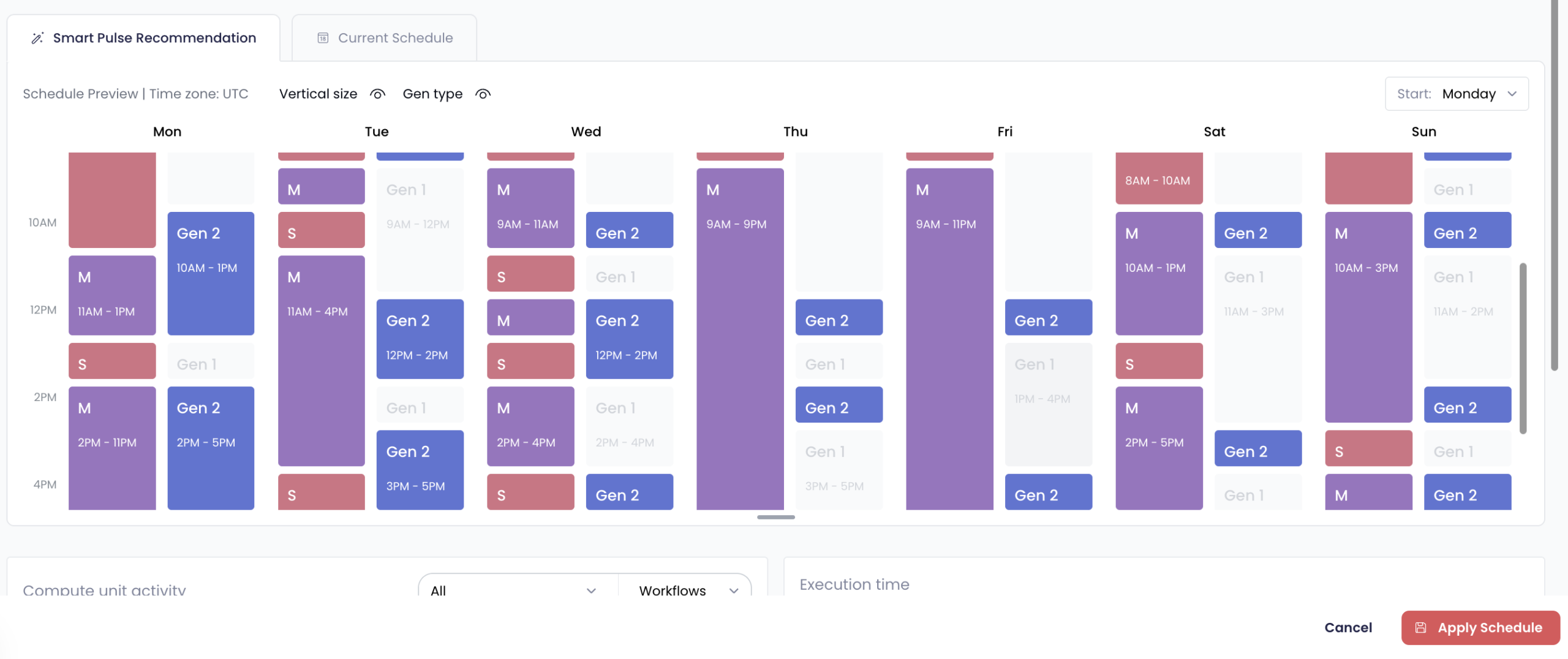
Smart Pulse is an automated Snowflake warehouse right-sizing system that adjusts warehouse size and generation (Gen1 or Gen2) hourly based on historical workload patterns, spillage, and performance SLAs.
Manual sizing works for stable workloads, but ETL patterns shift constantly.
Smart Pulse analyzes historical data and adjusts warehouse size hourly based on actual load, spillage, and performance targets. It learns workload rhythms and adapts proactively.
Example: Your dbt transformations run at 6 AM. Smart Pulse scales from Medium to Large at 5:55 AM, processes workloads efficiently with no spillage, then drops to Medium by 8 AM. The warehouse matches actual demand hour by hour automatically.
The system tracks query load percentage, spillage patterns, and performance SLAs. One customer reduced costs 30% in the first month by eliminating static configurations.
Start with diagnostic queries for obvious misconfigurations. For evolving workloads, Smart Pulse’s hourly right-sizing ensures configs never drift.
Watch this session to learn how to prevent unnecessary warehouse costs by right-sizing your Snowflake warehouse and migrating to Gen2.
2. Proven Snowflake multi-cluster strategies
When 10 analysts hit your warehouse simultaneously, queries queue. Horizontal scaling handles concurrency, not query complexity.
Standard vs Economy Policies:
- Standard: Starts new clusters after ~20 seconds of sustained queuing. Prioritizes performance.
- Economy: Waits ~6 minutes before adding clusters. Prioritizes cost efficiency.
The Scale-In Problem: Both policies are reactive. They wait for inactivity windows (2–6 minutes) before spinning down clusters. Short idle periods between bursts still cost you a full active cluster.
Intelligent Cluster Management with Auto-Scaler
Auto-Scaler handles real-time cluster cleanup. It does not predict future demand or pre-warm clusters. Predictive scheduling happens elsewhere.
SeemoreData’s Auto-Scaler solves the scale-in challenge by enforcing strict scale-in behavior: any cluster in a multi-cluster configuration that is idle for more than 1 minute is automatically spun down, regardless of the policy selected (Standard or Economy).
Key Features:
- No extended idle time– Auto-Scaler removes the 2.5–6 minute wait windows used by Snowflake policies, enforcing a consistent 1-minute idle timeout across the board.
- Lower costs during bursty workloads– Instead of keeping clusters up “just in case,” Auto-Scaler trims them rapidly after usage drops.
- Non-intrusive overlay– Auto-Scaler doesn’t override your configured min/max clusters or change policies. It simply acts as a guardrail to prevent waste when Snowflake’s default behavior would leave clusters idle.
- Complement to predictive planning– Auto-Scaler is reactive, not predictive. It doesn’t “learn” patterns or pre-warm clusters based on history (e.g., Friday 4PM usage). That’s the job of offline schedulers like SmartPulse, which define optimized warehouse configurations per hour based on historical workload patterns.
3. When to use Snowflake Gen2 vs Gen1 warehouses
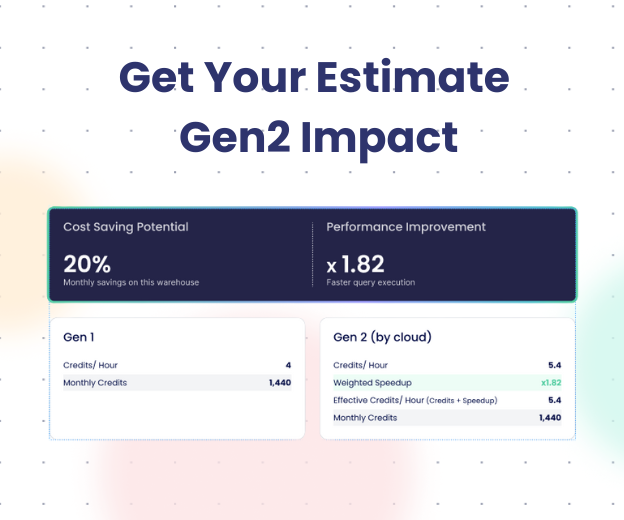
Gen2 warehouses run on faster hardware (Graviton3 on AWS, equivalent on Azure/GCP) and cost 25%-35% more per hour. Real-world benchmarks show 20-60% performance gains on data-intensive workloads. Simple SELECT queries see minimal benefit (5-15%), making Gen2 more expensive for lightweight operations.
When Gen2 Wins
Complex joins scanning billions of rows, CTAS operations, heavy MERGE/UPDATE/DELETE, aggregate processing. Example: A Gen1 warehouse running a complex MERGE completes in 48 seconds (1.33 credits/hour × 0.013 hours = 0.017 credits). Gen2 completes the same operation in 13.6 seconds (1.8 credits/hour × 0.004 hours = 0.007 credits). Gen2 costs 35% more per hour but uses 58% fewer total credits.
When Gen1 Suffices
Simple SELECT on small datasets, lookups, basic aggregations. These see 5-15% improvement that doesn’t justify the premium.
How to make the transition from Gen1 to Gen2 Warehouse:
ALTER WAREHOUSE <WAREHOUSE_NAME>
SET RESOURCE_CONSTRAINT = STANDARD_GEN_2;
Your transformation warehouse runs heavy MERGE operations during morning ETL (Gen2-optimal) but processes lightweight SELECT queries in the afternoon (Gen1-sufficient). Statically choosing Gen1 means slow mornings. Choosing Gen2 means overpaying for simple afternoon queries.
Smart Pulse handles dynamic Gen switching based on performance SLAs and workload characteristics.
For example:
Morning ETL (6-9 AM): Heavy DML detected → Gen2 → MERGE operations 40% faster, meeting 3-hour SLA
Afternoon Queries (9 AM-6 PM): Lightweight SELECT → Gen1 → Lower hourly rate, no performance impact
Overnight (6 PM-6 AM): Minimal activity → Gen1 with aggressive auto-suspend → Cost minimization
One team processing 2 billion rows daily saw transformation windows drop from 4.5 to 2.7 hours using Gen2 for heavy workloads while reducing total daily costs 22% through Gen1 efficiency during lighter periods.
Gen2 isn’t universally better. Smart Pulse’s dynamic switching means you use Gen2 when speed matters and Gen1 when efficiency suffices, adapting automatically throughout the day.
4. How to configure Snowflake auto-suspend correctly
How Snowflake auto-suspend actually works
Snowflake’s recommended baseline is simple: suspend warehouses quickly after activity stops to avoid paying for idle compute. For short, bursty workloads like BI queries, Snowflake documentation and field practice both point to 60 seconds as the sweet spot.
You set AUTO_SUSPEND = 60 expecting the warehouse to shut down 60 seconds after the last query.
Optimizing Auto-Suspend Native Settings:
— For short-burst workloads, set to minimum
ALTER WAREHOUSE bi_queries_wh SET AUTO_SUSPEND = 60;
Why AUTO_SUSPEND = 60 still wastes credits
The problem is that AUTO_SUSPEND does not mean “suspend exactly X seconds after the last query.
Snowflake’s 60-second minimum billing and suspension checks every ~30 seconds mean a 5-second query might run 90-120 seconds before suspending. Multiply across hundreds of daily queries and you’re paying 10-20% more idle time than expected.
Native auto-suspend has three gaps: 60-second minimum billing, 30-second check intervals, and multi-cluster warehouses suspending only when all clusters idle. These don’t matter for long-running workloads (30+ minute ETL jobs) but add up fast for short-burst patterns (5-30 second BI queries).
Configure based on patterns: 60 seconds for short bursts, 5-10 minutes for cache-dependent workloads. But even optimized settings leave money on the table.
What true idle elimination changes?
The solution: Auto-Shutdown for true idle elimination
Native auto-suspend uses polling (check every 30 seconds, wait for timeout, then suspend). Auto-Shutdown removes the waiting.
Auto Shutdown monitors activity at 1-5 second intervals and forces immediate suspension when queries stop.
Real BI workload cost comparison
BI Dashboard (150 queries/day, 8 seconds average):
- Native: 150 × 90 seconds = 3.75 hours billed
- Auto Shutdown: 150 × 8 seconds = 0.33 hours billed
- 91% idle waste reduction
Ad-hoc Analyst (300 queries/day, 5-45 seconds variable):
- Native: Constant churn, 6.2 hours daily
- Auto Shutdown: Immediate suspension, 2.1 hours daily
- 66% cost reduction
The system eliminates post-query idle time (suspension within 5 seconds), multi-cluster gaps (individual cluster suspension), and cache warming waste (intelligent brief delays when activity is imminent).
For example – one customer running hundreds of short-burst queries (Looker, Tableau) saw costs drop 18% in the first week just by eliminating seconds-level idle waste native auto-suspend couldn’t catch.
A warehouse that’s right-sized (Smart Pulse), properly clustered (Auto-Scaler), and idle-free (Auto Shutdown) runs 40-60% more efficiently than defaults.
5. How to automate and continuously optimize Snowflake warehouses
You’ve audited configurations, right-sized warehouses, tuned multi-cluster settings, optimized auto-suspend. Three months later, new data sources double ETL volume, analysts run heavier queries, dashboard patterns shift. Your configs are outdated again.
One-time optimizations work for static environments. Modern data platforms evolve constantly.
The Complete Optimization Stack
Manual tuning gives point-in-time fixes. Continuous automation gives adaptive infrastructure that evolves with workloads.
- Layer 1: Vertical (Smart Pulse): Hourly dynamic right-sizing analyzing 30 days of patterns.
- Layer 2: Horizontal (Auto-Scaler): Cluster elasticity adjusting min/max policies based on concurrency patterns.
- Layer 3: Temporal (Auto Shutdown): Idle elimination through 1-5 second monitoring.
Compounding Effect
A transformation warehouse running dbt models:
- Without optimization: XL static, single cluster, 60s auto-suspend → $2,400/month
- Smart Pulse only: Dynamic sizing → $1,680/month (30% savings)
- Smart Pulse + Auto Shutdown: Dynamic sizing + immediate suspension → $1,200/month (50% savings)
- Full stack: Smart Pulse + Auto-Scaler + Auto Shutdown → $960/month (60% savings)
Start with manual optimization to understand the baseline. Fix obvious misconfigurations with diagnostic SQL. Then evaluate which workloads benefit from continuous adaptation. The optimization stack eliminates repetitive config tuning so you can focus on building data products.
The “Build vs. Buy” Reality
You now have what you need to optimize your snowflake warehouse, manually right sizing your warehouse, transition to gen 2, set auto-suspend correctly.
Or, you can let an agent do it in order to make significant cost savings.
Seemore’s optimization stack provides three layers:
- Smart Pulse: Hourly dynamic right-sizing with Gen1/Gen2 switching based on actual workload patterns
- Auto-Scaler: Intelligent cluster elasticity learning concurrency rhythms and adapting proactively
- Auto Shutdown: True idle elimination with 1-5 second monitoring closing native auto-suspend gaps
Manual Snowflake optimization works for stable workloads.
Automated optimization becomes valuable when query patterns, data volume, and concurrency change weekly or daily for making significant cost savings.
Teams that adopt continuous automation to right-size Snowflake warehouses and eliminate idle spend typically reduce costs by 30–70%
Ready to cut you Snowflake warehouse costs?
Run a free 14-day Pulse Check and we will show you exactly how you can prevent unnecessary costs in your Snowflake warehouse.

FAQ
What’s the difference between vertical and horizontal warehouse scaling in Snowflake?
The difference between vertical and horizontal warehouse scaling is that vertical scaling changes warehouse size (XS to Small to Medium) to handle query complexity and memory requirements. Horizontal scaling adds compute clusters to handle concurrency (multiple users running queries at once).
How do I know if my warehouse is oversized or undersized?
Run the diagnostic WAREHOUSE_LOAD_HISTORY query. If average load is under 60%, it’s oversized. If you see bytes_spilled_to_remote_storage in QUERY_HISTORY, it is undersized (memory bound).
When should I use Gen2 warehouses instead of Gen1?
Use Gen2 for memory-intensive work: complex joins, heavy MERGE operations, and massive aggregations. The 35% cost premium is offset by 50%+ faster speeds. Avoid Gen2 for simple SELECT queries or small lookups.
What is warehouse spillage in Snowflake?
Spillage occurs when a query exceeds the warehouse’s RAM. Local spillage goes to SSD (slow); Remote spillage goes to S3/Blob storage (very slow). Remote spillage is a primary indicator that you need to scale up vertically.
How does multi-cluster warehouse scaling policy (Standard vs Economy) affect costs?
Standard policy starts new clusters after approximately 20 seconds of sustained queuing, prioritizing performance over cost. This can lead to brief over-provisioning during transient spikes. Economy policy waits approximately 6 minutes of sustained load before adding clusters, prioritizing cost efficiency but tolerating brief queuing. Economy can save 30-40% versus Standard on variable workloads, but may frustrate users with time-sensitive needs.
Can automation tools optimize better than manual tuning?
Yes, because workloads shift hourly. Manual tuning fixes the “average” state of a warehouse, while automation like Smart Pulse adjusts configurations in real-time to match the specific needs of the current hour.