Snowflake Data Types: Practical Cheat Sheet, Aliases, and VARIANT Examples
One query cost $5K. Yours could be next - or you could see it coming.


A lot of guides of Snowflake data types stay at the dictionary level. Engineers need more than that.
You need to know which type to pick, which aliases Snowflake treats as the same thing, how to inspect a live table, and what happens when semi-structured columns grow into a storage and compute mess.
Snowflake supports the usual SQL families plus semi-structured types such as VARIANT, OBJECT, and ARRAY. In practice, the questions teams ask most often are much narrower: Is STRING just an alias for VARCHAR? How do I check a column’s actual type in INFORMATION_SCHEMA?COLUMNS? What does TYPEOF() return for a VARIANT value? The good news is that those answers are clean once you strip away the noise.
Snowflake treats STRING, TEXT, NVARCHAR, NVARCHAR2, CHAR VARYING, and CHARACTER VARYING as aliases for VARCHAR. No speed bonus comes from choosing one alias over another. The better choice is consistency in your modeling standards.
Table of contents
- Snowflake data types cheat sheet
- Understanding Snowflake string aliases
- Core data type families that matter in real projects
- Semi-structured types: VARIANT, OBJECT, and ARRAY
- How to check data types in Snowflake
- Using TYPEOF on VARIANT values
- A step-by-step way to choose the right type
- Common pitfalls that quietly raise cost
- FAQ
- Pick cleaner types before the bill catches up
Snowflake data types cheat sheet
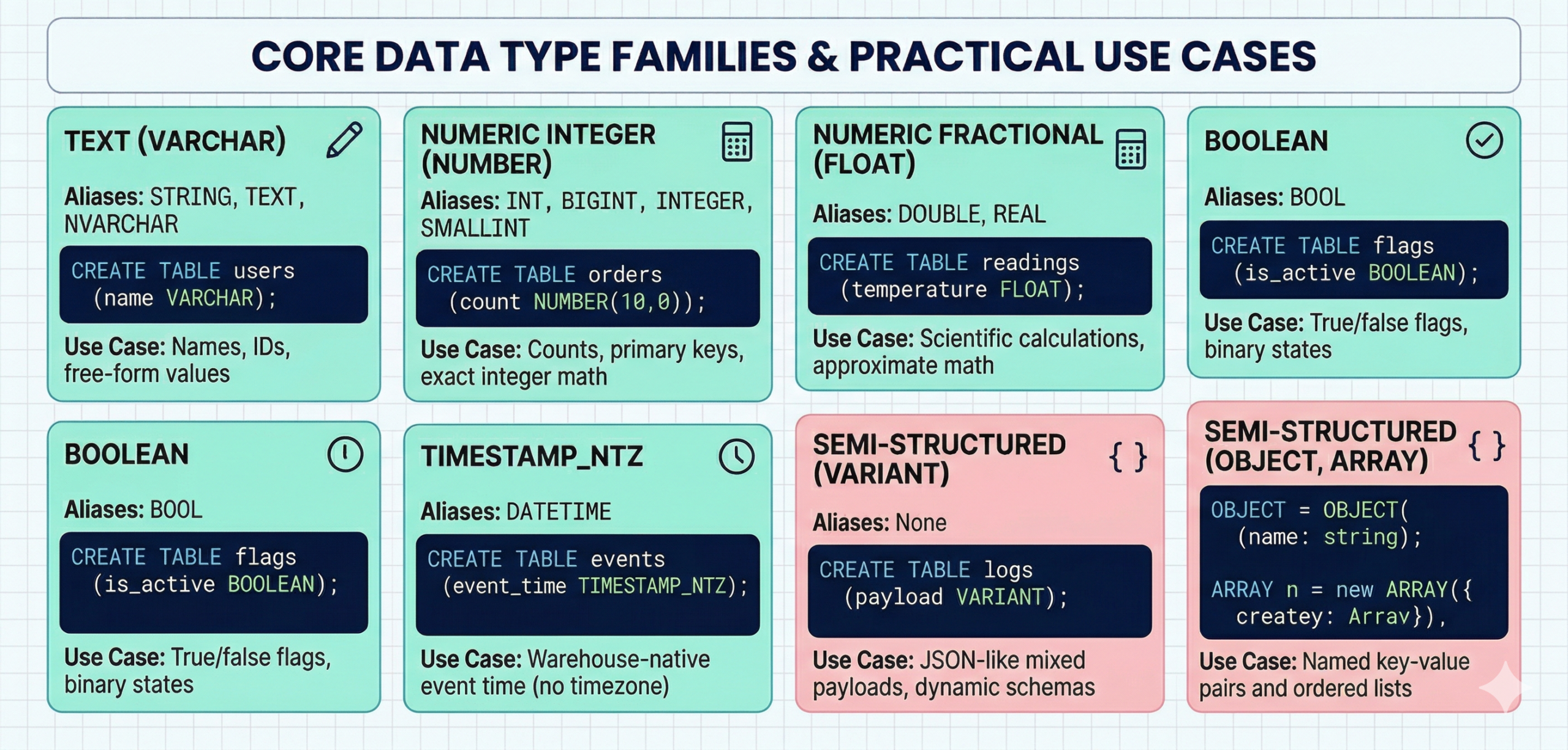
For the current reference pages, see Snowflake’s official docs for data types, string types, and semi-structured types.
Understanding Snowflake string aliases
Snowflake developers search for Snowflake string data type alias varchar for a good reason. Teams see VARCHAR, STRING, and TEXT in codebases and assume they carry different behavior.
They do not.
In Snowflake, those names map to the same underlying text type. Picking STRING instead of VARCHAR will not shrink storage, speed queries, or change how the column behaves. The real risk is team confusion. A mixed naming style makes reviewers wonder whether a modeling decision exists where none actually does.
A clean house rule helps more than a clever alias. Most teams standardize on VARCHAR in DDL and allow STRING in ad hoc discussions.
The table above creates four text columns, but Snowflake treats each one as the same text family.
CTA placeholder 1
Not sure which modeling choices are inflating spend?
Get a sharper view
Schedule a demo
Core data type families that matter in real projects
Most production design work happens in five families: text, exact numeric, approximate numeric, temporal, and semi-structured.
Exact numerics matter when money, quantities, and reconciliations need stable math. Floating types help when approximate math is acceptable, and scale matters more than exact decimal behavior. Timestamps become tricky when teams mix TIMESTAMP_NTZ, TIMESTAMP_LTZ, and TIMESTAMP_TZ without a rule.
A few practical rules keep projects calm:
- Use exact numeric types for finance and billing logic.
- Use TIMESTAMP_NTZ for warehouse-native event time when you do not need timezone offsets in the stored value.
- Use TIMESTAMP_TZ when offset preservation matters across systems.
- Use BOOLEAN for flags instead of text values like yes and no.
Teams that care about warehouse behavior should also connect type choices to spending. Wide text columns, repeated casts, and bloated semi-structured payloads not only annoy analysts. They also drive more scan work and harder-to-govern storage patterns, which is one reason Snowflake warehouse tuning and continuous cost control belong in the same operating loop.
Semi-structured types: VARIANT, OBJECT, and ARRAY
VARIANT is the flexible workhorse. It can hold values of different kinds, including strings, numbers, arrays, and objects.
OBJECT stores key-value pairs. ARRAY stores ordered lists. Both often appear inside VARIANT columns, especially when data lands from event streams, APIs, or application logs.
A simple snowflake variant data type example looks like this:
VARIANT is useful because it helps teams move fast while source payloads still change. The trade-off shows up later. A column full of everything can turn into a column nobody governs well.
How to check Snowflake data types
When engineers ask about snowflake information_schema.columns data_type varchar text, they usually want to inspect live tables fast and settle a modeling argument with evidence.
Use INFORMATION_SCHEMA.COLUMNS first.
That query gives you the declared type Snowflake stores for each column. It is the cleanest way to check whether a column shows up as VARCHAR, NUMBER, VARIANT, or another family.
For account-wide work, pair it with schema and database filters so you do not pull noise from every environment.
Using TYPEOF on VARIANT values
Declared type and stored value are not always the same conversation. A VARIANT column can contain strings in one row, arrays in another, and objects in a third.
TYPEOF() helps you inspect the value inside the VARIANT.
Typical results look like VARCHAR, ARRAY, or DECIMAL. Snowflake’s own docs note that an exact-looking integer can still return DECIMAL because of the way the value is stored and surfaced.
A more realistic example looks like this:
That pattern saves time during ingestion work, contract debugging, and audit queries where the source system has not behaved as promised.
A step-by-step way to choose the right type
Step 1: Start with query behavior, not only the source shape
A source API can hand you JSON for everything. That does not mean your warehouse model should keep everything as semi-structured forever.
Pick types based on the filters, joins, and aggregations you expect to run.
Step 2: Lock exact math early
Money, inventory, billing units, and quotas deserve exact numerics. Fixing approximate math after dashboards ship is a slow way to lose trust.
Step 3: Keep timestamps boring
Pick one default timestamp pattern for your warehouse models. Teams that mix timezone-aware and timezone-free types without a clear reason create pain for every analyst downstream.
Step 4: Use VARIANT as a landing zone, not a final answer for everything
VARIANT is excellent at intake. Final serving models usually benefit from typed columns for the fields people join, filter, and chart every day.
Step 5: Review type sprawl during cost reviews
A messy type system often shows up as repeated casts, awkward model logic, and heavier scan work. Teams that already review query and warehouse spend should review modeling choices in the same cycle.
Common pitfalls that quietly raise costs
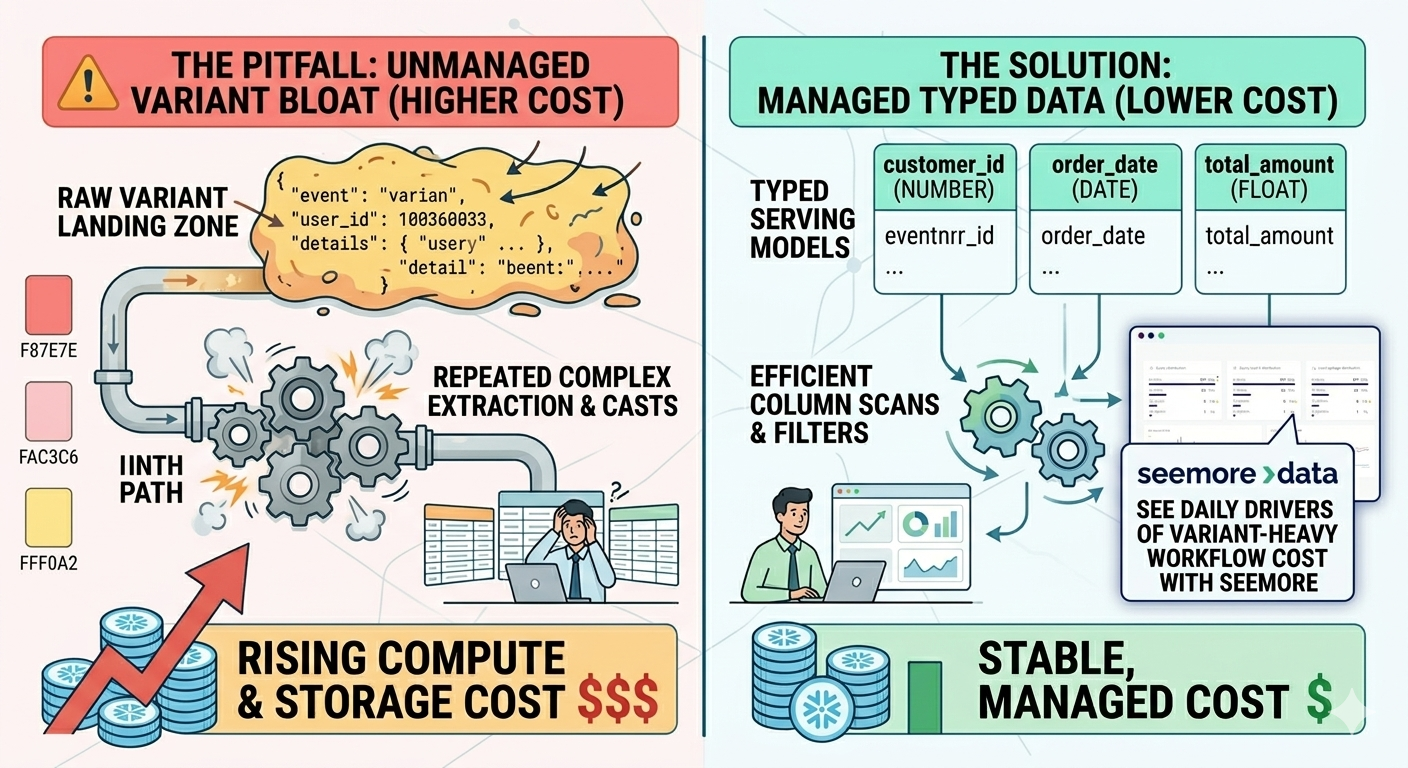
The most common trap is not a wrong alias. It is a lazy habit.
Teams land raw payloads in VARIANT, promise to clean them later, and then build half the warehouse around repeated path extraction and casts. Queries get heavier. Storage grows. Ownership gets fuzzy.
Another trap shows up when teams keep huge semi-structured blobs in serving models long after they have identified the fields they actually use. A lean typed table is easier to read, easier to govern, and often cheaper to work with.
That is a good place to bring Seemore into the story, lightly and honestly. Standard performance tools can show that a query slowed down. Seemore can help a team see how much a bloated VARIANT-heavy workflow costs across compute, storage, and downstream usage by combining cost attribution with warehouse behavior analysis.
CTA placeholder 2
Still guessing where Snowflake spends comes from?
See the daily drivers
Schedule a demo
FAQ
Is STRING an alias for VARCHAR in Snowflake?
Yes. Snowflake treats STRING as an alias for VARCHAR. The same idea applies to TEXT and several other text-style names. Pick one naming rule and stay consistent.
Is there any performance difference between VARCHAR and TEXT in Snowflake?
No. Teams do not get a speed or storage edge from choosing TEXT over VARCHAR. The real benefit comes from consistency in schema design and from reducing repeated casts in queries.
How do I check a column’s data type in Snowflake?
Query INFORMATION_SCHEMA.COLUMNS and inspect the data_type field for the target table. That is usually the fastest way to answer modeling questions in a live environment.
What does TYPEOF return for a VARIANT value?
TYPEOF() returns the underlying stored value type, such as VARCHAR, ARRAY, OBJECT, BOOLEAN, or DECIMAL. It is useful when a single VARIANT column stores mixed payload shapes.
When should I keep data in VARIANT instead of casting it into typed columns?
Keep data in VARIANT at landing time or when the payload shape still changes often. Cast into typed columns once the business logic stabilizes and the same fields keep showing up in joins, filters, and dashboards.
Pick cleaner types before the bill catches up
Data type decisions feel small when a project starts. A few months later, those same decisions shape query weight, review friction, and how hard it is to explain warehouse cost.
The strongest teams use VARIANT where it helps, cast where it pays off, and standardize aliases before the codebase turns into a trivia contest.