Snowflake Cost Optimization: Benchmark Warehouse Efficiency and Unlock Savings

Snowflake Cost Optimization starts with understanding how warehouse behavior affects spend over time. Idle minutes, oversized compute, and weak cluster efficiency often look harmless day to day, but they add up fast.
The fastest way to get control is to benchmark efficiency before you start tuning settings. A clear score helps data teams see where waste sits, where performance drifts, and which fixes deserve attention first. For teams already reviewing broader Snowflake warehouse optimization, this gives you a practical place to start.
TL;DR
- Snowflake cost optimization starts with understanding warehouse efficiency and identifying unused compute.
- A Snowflake cost savings tool like Seemore Data helps benchmark performance and estimate savings without moving data.
- The strongest signals usually come from idle time, multi-cluster waste, warehouse sizing, and clustering effectiveness.
- When teams can see those signals in one place, they can cut waste faster and protect performance at the same time.
Table of Contents
- What Is Snowflake Cost Optimization and Why Does It Matter?
- How to Measure Snowflake Warehouse Efficiency
- Step-by-Step: Benchmark Your Efficiency Score and Prioritize Savings
- How a Snowflake Cost Savings Tool Identifies Waste
- Snowflake Performance Optimization: Key Metrics to Track
- Benchmark Your Snowflake Efficiency Score Before the Next Cost Review
- FAQ
What Is Snowflake Cost Optimization and Why Does It Matter?
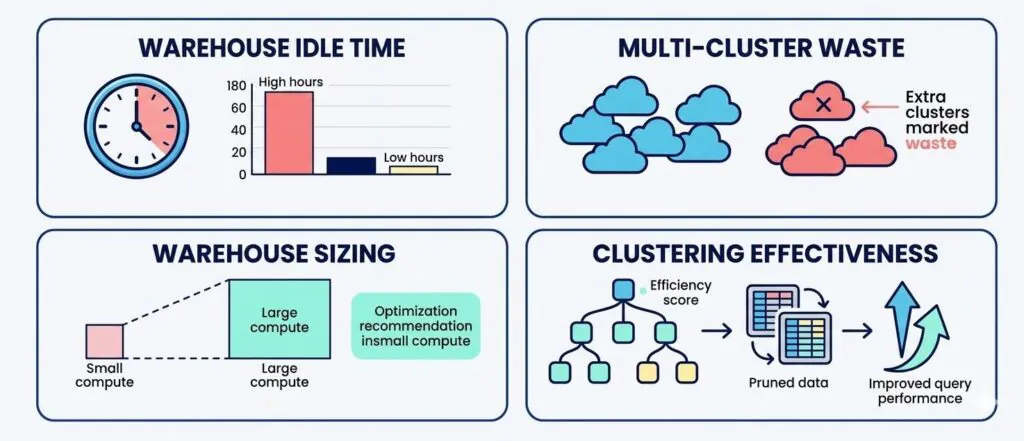
a four-part infographic that visually breaks down the overall efficiency score into its key components: warehouse idle time, multi-cluster waste, warehouse sizing, and clustering effectiveness.
Snowflake cost optimization means matching compute behavior to real workload demand. The goal is simple: pay for the performance your team needs, not for idle time, oversized warehouses, or clusters that stay alive after concurrency drops.
Cost reviews often start too late. Finance asks about a renewal, engineering sees performance drift, or a monthly bill lands higher than expected.
Native usage data can show what happened. Most teams still need help deciding what matters first. Snowflake’s WAREHOUSE_METERING_HISTORY view gives teams hourly warehouse credit usage for up to one year, which makes it useful for spotting where spend concentrates before anyone starts changing settings.
A better process starts with a benchmark. A warehouse efficiency score separates normal spend from avoidable waste before anyone changes settings or starts another cleanup sprint.
Snowflake performance optimization belongs in the same review. Lower spend only counts when pipelines, dashboards, and analyst workflows still run at the speed the business expects.
A tight benchmark creates that balance. Data leaders get a fast read on idle time, multi-cluster drag, warehouse sizing gaps, and clustering issues, then move into action with better context.
How to Measure Snowflake Warehouse Efficiency
Snowflake warehouse efficiency answers a practical question: how much of your compute spend actually supports useful work?
A strong benchmark does not stop at total credits. You need signals that explain whether a warehouse spends its time running queries productively or sitting open between bursts.
Seemore Data’s 14-day free trial gives teams a first look at where their own Snowflake warehouses waste compute. It works from metadata only and gives a quick baseline rather than a full platform rollout, which makes it useful before a renewal discussion or an optimization project.

The four signals behind an efficiency score
Warehouse idle time shows how long a warehouse stays up without doing meaningful work. Idle minutes often hide in busy accounts because the waste spreads across the day instead of showing up as one obvious spike.
Multi-cluster idle time shows when extra clusters remain available after demand drops. Teams often size for peaks and forget to check how quickly concurrency falls back down. Snowflake notes that multi-cluster warehouses can scale cluster count for concurrency, but auto-suspend applies to the warehouse as a whole, not to individual clusters.
Warehouse size efficiency compares workload shape to warehouse sizing. Small jobs on large compute look harmless until repeated runs turn convenience into a budget problem. Teams that keep seeing this pattern should also review Seemore’s guide to intelligent warehouse auto-shutdown.
Clustering effectiveness helps teams judge whether clustering earns its keep. A clustering strategy should improve pruning and query behavior enough to justify the added spend. Snowflake’s guidance on clustering keys makes the tradeoff clear: clustering is useful when it improves pruning on large tables, but it should still be weighed against its maintenance cost. Teams reviewing whether clustering earns its keep should also see Seemore’s guide to optimizing Snowflake auto-clustering at scale with AI.
What a first-pass benchmark should answer:
A good benchmark should tell you where you pay for unused compute, which warehouses look oversized, and which areas deserve a deeper review.
Snowflake performance optimization requires visibility into idle time, warehouse sizing, and clustering efficiency. A score without those signals turns into a dashboard number with no next step.
Step-by-Step: Benchmark Your Efficiency Score and Prioritize Savings
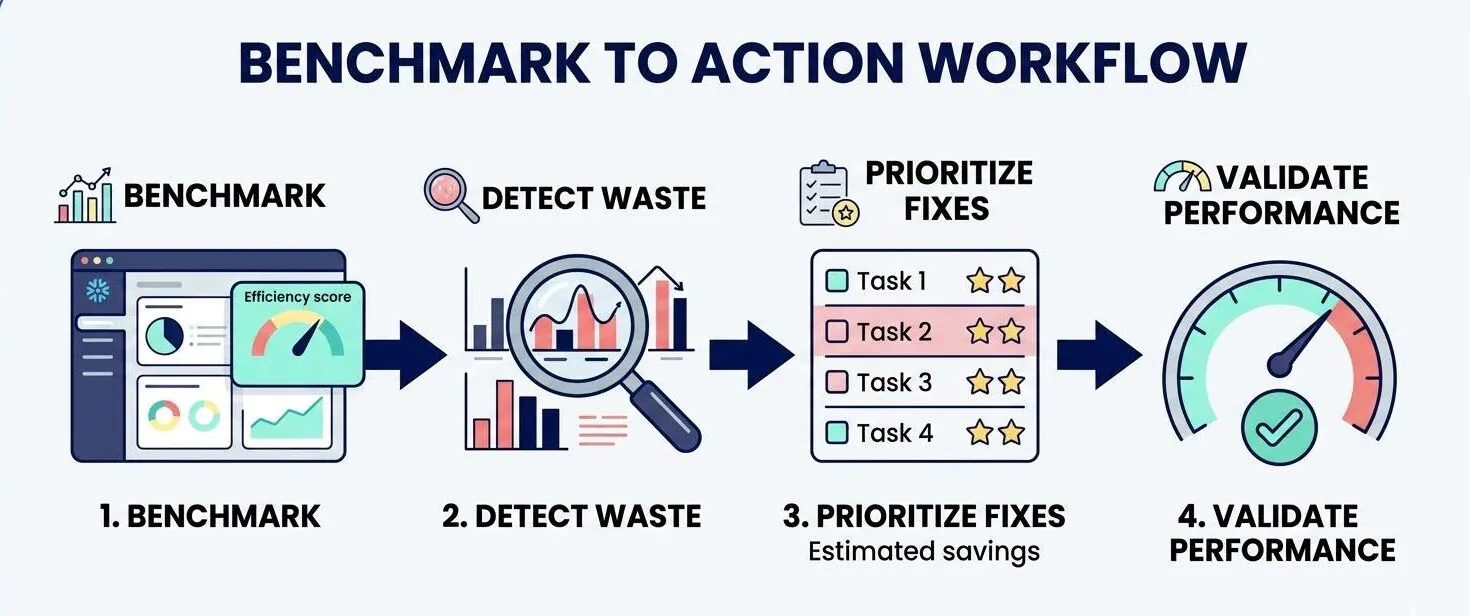
A professional review works best when you move from baseline to action in a fixed order.
- Start with the warehouses that matter most. Focus on the warehouses that drive the most spend, support critical dashboards, or handle core transformation jobs. A benchmark on low-impact warehouses can distract the team from the real budget drivers.
- Run the efficiency benchmark. Review the score and the supporting signals for warehouse idle time, multi-cluster idle time, warehouse size efficiency, and clustering effectiveness. A first pass should show where waste concentrates fastest.
- Separate waste from justified overhead. Some cost protects SLAs, handle bursty demand, or keep executive reporting responsive. Keep those cases in view so the team does not confuse a healthy buffer with a bad configuration.
- Estimate savings by fix type. Group opportunities by action: suspend behavior, warehouse sizing, cluster behavior, and clustering review. A grouped view makes planning easier than one long list of warehouse-level findings.
- Prioritize the safest, highest-impact changes. Start with fixes that lower cost without pushing latency or runtime into risky territory. Then retest the score after each change so the team can see what actually improved.
A benchmark does not replace deeper optimization work. A benchmark does give your team a sharper place to start.
How a Snowflake Cost Savings Tool Identifies Waste
A strong Snowflake cost savings tool does more than highlight expensive warehouses. The real value comes from showing why a warehouse looks expensive and whether the spend supports useful work.
Seemore Data works as that first-level analysis. Teams can review estimated savings and the main waste signals, and Seemore works from metadata only, with no data stored.
Waste usually falls into a few familiar patterns. Idle warehouse minutes pile up between short runs. Multi-cluster warehouses hold extra capacity longer than needed. Oversized warehouses finish modest jobs at a premium cost. Clustering can also create drag when the pruning benefit does not justify the added spend.
Estimated savings help teams rank opportunities, not promise an exact future bill. A smart review treats that estimate as a planning signal, then validates each fix against performance needs.
Plenty of teams only need that first audit to find the next move. Others use the score as a screening step before a broader optimization effort.
Either way, the app makes the first conversation more concrete. Leaders stop debating where waste might sit and start reviewing where it actually appears.
Snowflake Performance Optimization: Key Metrics to Track
Cost and performance move together in Snowflake. Teams that cut spend blindly often trade a smaller bill for slower jobs, more queueing, or unhappy dashboard users.
The right metric set helps you avoid that trap.
Cost metrics worth tracking
- Idle time by warehouse: shows where compute stays on without useful work
- Compute concentration: shows which warehouses drive most of the spend
- Estimated savings by waste category: helps rank actions by likely payoff
- Cluster scale-in behavior: shows how quickly extra capacity drops after peak demand
Performance metrics worth tracking
- Query runtime trends: shows whether users feel real improvement or real pain
- Memory spillage signals: points to warehouses that are too small for the workload
- Warehouse size fit: helps teams stop using large compute for small jobs
- Pruning or clustering efficiency: shows whether the storage layout supports faster scans
A balanced review matters because not every expensive warehouse needs to shrink. Some workloads cost more because they protect a hard SLA or absorb unpredictable bursts.
The benchmark gives teams a fast baseline. Ongoing Snowflake performance optimization comes from tracking how each change affects runtime, concurrency, and cost at the same time.
Benchmark Your Snowflake Efficiency Score Before the Next Cost Review
Snowflake teams do not need to begin with a major transformation project. Most teams need a quick, credible baseline that shows where compute waste sits and where performance risk starts.
A warehouse efficiency score gives you that baseline. The review moves faster because the conversation starts with evidence, not intuition.
If your team wants a first-pass benchmark, start a 14-day free trial of Seemore Data to review warehouse efficiency and estimated savings before the next budget meeting, renewal conversation, or platform tuning cycle.
FAQ
What is Snowflake cost optimization?
Snowflake cost optimization means aligning warehouse spend with real workload demand. Teams look for waste in idle time, sizing, cluster behavior, and storage-related choices, then tune those areas without hurting the jobs, dashboards, and response times the business depends on.
How do you measure Snowflake warehouse efficiency?
Teams usually start with warehouse idle time, multi-cluster idle time, warehouse size efficiency, and clustering effectiveness. A benchmark built around those signals gives data leaders a practical way to compare spend against useful work instead of staring at total credits alone.
What should a Snowflake cost savings tool show first?
A useful Snowflake cost savings tool should surface the biggest waste signals first: idle minutes, oversized warehouses, weak cluster scale-in, and low-value clustering. Seemore Data brings those signals together, with estimated savings for each.
Which metrics matter most for Snowflake performance optimization?
Query runtime trends, memory spillage, warehouse size fit, cluster responsiveness, and clustering efficiency matter most. Snowflake performance optimization works best when teams review those metrics alongside cost signals so they can improve speed without brute-force oversizing.
Can an efficiency score estimate Snowflake savings accurately?
An efficiency score can point teams toward realistic savings opportunities, but a score should guide prioritization, not replace validation. Teams still need to review workload context, SLA pressure, and post-change performance before they treat any estimate as a final savings number.
How can teams reduce idle time in Snowflake warehouses?
Teams usually start by reviewing suspend behavior, warehouse sizing, workload grouping, and cluster scale-in patterns. A benchmark can show where idle time hides, then help the team decide whether to change settings, consolidate workloads, or review scheduling choices.
Why does clustering effectiveness matter for Snowflake cost optimization?
Clustering adds cost, so teams should expect a clear return in pruning and query behavior. When clustering effectiveness stays weak, the account can absorb extra spend without a meaningful performance gain. A benchmark helps flag that gap early and direct the next review.