
Save Where It Counts: Matching Snowflake Auto-Scaling to What Each Workload Needs


Demand for compute never holds still. Pipelines kick off at night, dashboards light up in the morning, AI workloads spike without warning, and quiet hours follow every rush.
Snowflake handles those swings well. Multi-cluster warehouses add capacity when queries pile up, so work keeps moving. But capacity that’s added for a rush doesn’t always leave when the rush does. And every minute a cluster runs with nothing to do is a minute you pay for.
That idle time rarely shows up as a single dramatic number. It adds up quietly, warehouse by warehouse, hour by hour. Saving it isn’t about cutting corners on performance. It’s about knowing where you can save, and where you shouldn’t.
Why idle costs need automation on top of Snowflake
Snowflake’s scaling is built to serve queries. Its job is to make sure work gets done, not to keep your costs under control. That’s the right priority for a data platform, and it leaves a gap that only you can close.
The usual way to close it is with settings: scaling policies, cluster limits, auto-suspend times. Settings help, but they share one weakness. They’re set once, while the workload behind them changes every day. A configuration that fit last month’s traffic may be too generous today, and nobody has time to revisit every warehouse every week.
Idle cost is a moving target, and it needs something that moves with it. Automation watches every warehouse continuously, responds the moment load drops, and closes clusters that no longer have work to do. No one has to remember, check or adjust. The savings happen in real time, as the workload changes.
When it’s right to automate critical workloads
The first question data teams ask about automation is usually the right one: what happens to the workloads we can’t afford to slow down?
Not every workload carries the same weight. Some power customer-facing products, executive dashboards or processes with strict SLAs. For these, a few seconds of delay can mean a broken experience or a missed deadline. Others, like overnight ETL, internal reports or exploratory analysis, can absorb a short wait without anyone noticing.
Critical workloads can and should be automated, as long as the automation never makes a query wait. Closing clusters after the load drops saves money without touching performance, because the work is already done. The risk only appears when automation holds back capacity while queries are waiting for it.
So the real question isn’t whether to automate critical workloads. It’s how much each workload can give in return for savings, and the answer should be different for each one.
Flexibility is what makes savings safe
A single automation rule applied to every warehouse forces a bad choice: play it safe everywhere and leave savings on the table, or push for savings everywhere and put critical work at risk. Flexibility removes that choice. You decide, warehouse by warehouse, how far to go.
That’s the idea behind the two modes of Seemore Data’s Auto-Scaler.
Standard mode closes idle clusters as soon as the load drops, which is where most of the savings come from. When demand rises, it opens a new cluster on demand, just as Snowflake would. Queries never wait for Auto-Scaler. It’s built for the workloads where every second counts.
Cost-optimized mode closes idle clusters the same way, and goes one step further on the way up. Before opening a new cluster, it waits briefly, so short bursts are absorbed by the clusters already running instead of spinning up new ones that would soon sit idle. The wait is learned for each cluster from its own recent usage, up to three minutes, and applied only to clusters that have mostly sat idle. If you prefer, you can set a maximum queue time yourself. Queries may wait a little, and the savings grow in return.
The result is automation that adapts to your priorities instead of the other way around. Critical warehouses stay fast. Flexible ones save more. And you decide where the line falls.
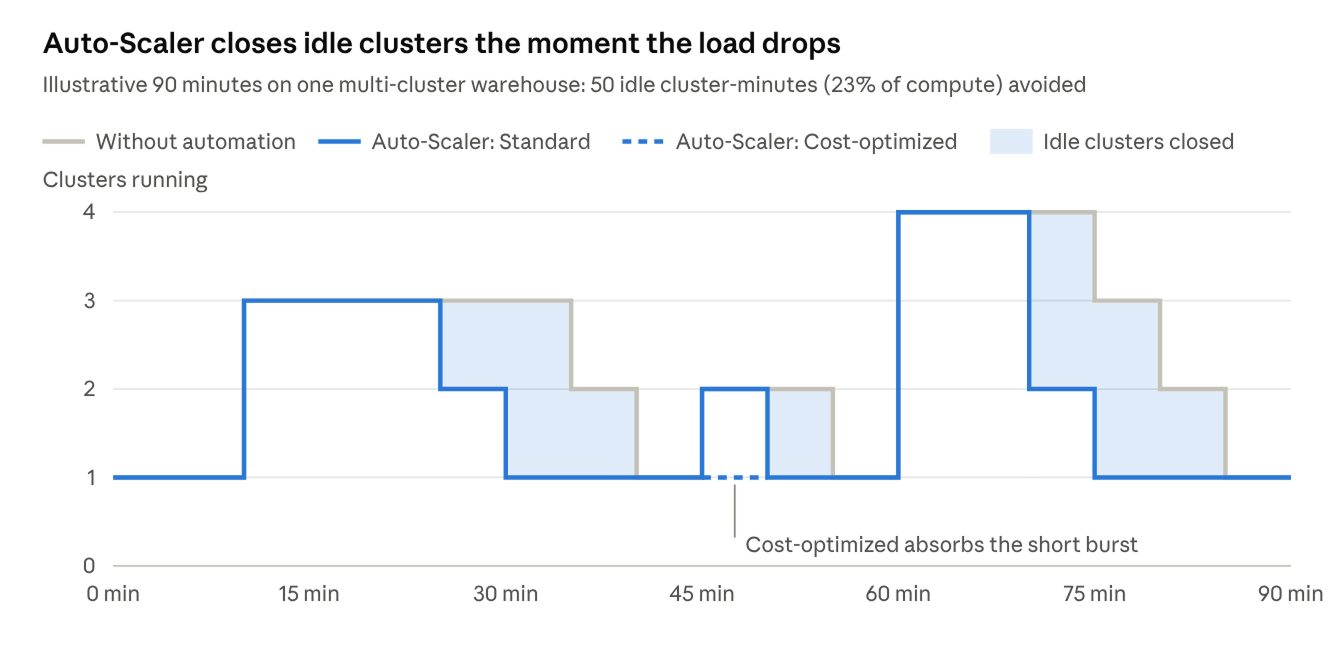
Without automation, extra clusters keep running after each rush. Auto-Scaler closes them as soon as the load drops, and in Cost-optimized mode a short burst is absorbed by the clusters already running.
How to choose for each warehouse
Three questions are usually enough to decide where each warehouse belongs.
| Question | Points to Standard | Points to Cost-optimized |
| Who feels it if a query waits? | Customers, executives or a process with an SLA | The data team, or no one at all |
| How time-sensitive is the work? | Results are needed the moment they’re requested | Results are needed within the hour, or by morning |
| How bursty is the load? | Steady demand that needs room to grow | Short spikes that existing clusters can absorb |
The answers can change over time. A warehouse that serves an internal report today may power a customer-facing feature next quarter. Because the mode is set per warehouse, you can revisit the choice whenever your priorities shift.
Savings and performance don’t have to compete
For years, cost optimization has been framed as a trade-off: save money or keep things fast. That framing assumes every workload has the same needs. They don’t.
When automation can tell the difference, and lets you decide where each workload belongs, savings stop being a risk to manage. They become a choice you make with confidence, warehouse by warehouse. Save where it counts, protect what matters, and let the automation handle the rest.
Frequently asked questions
Why do idle clusters drive up Snowflake costs?
Snowflake bills compute for every second a cluster runs, whether or not it’s doing work. When a multi-cluster warehouse scales out for a burst and the extra clusters keep running after the load drops, you pay for capacity nobody is using. Across many warehouses, that idle time adds up to a meaningful share of spend.
Aren't Snowflake's built-in settings enough to control idle costs?
Settings like scaling policies and auto-suspend help, but they’re static. They’re set once, while workloads change every day. Automation responds to the actual load in real time, closing idle clusters the moment they’re no longer needed, without anyone revisiting the configuration.
Is it safe to automate critical Snowflake workloads?
Yes, as long as the automation never makes queries wait. Closing clusters after the load drops saves money without affecting performance. For critical workloads, choose automation that opens new capacity on demand, exactly as Snowflake would.
What is Seemore Data's Auto-Scaler?
Auto-Scaler is a Seemore Data automation for Snowflake multi-cluster warehouses. It closes idle clusters as soon as the load drops and manages how new clusters open, so you pay only for the capacity your workloads need. It runs in one of two modes, chosen per warehouse.
What's the difference between Auto-Scaler's Standard and Cost-optimized modes?
Both modes close idle clusters as soon as the load drops. Standard opens a new cluster on demand, as Snowflake would, so queries never wait for Auto-Scaler. Cost-optimized waits briefly before opening a new cluster, so short bursts are absorbed by the clusters already running, for extra savings.
Will Auto-Scaler slow down my queries?
In Standard mode, no. Queries never wait for Auto-Scaler. In Cost-optimized mode, queries may wait briefly before a new cluster opens, up to a learned limit of three minutes or a maximum queue time you set. That’s the trade you choose in return for extra savings.
How does Cost-optimized mode decide how long to wait?
By default, Auto-Scaler learns a wait for each cluster from its recent usage, up to three minutes, and applies it only to clusters that have mostly sat idle. You can set a maximum queue time instead, and every cluster in that warehouse will wait that long before opening.
Can I use different Auto-Scaler modes for different warehouses?
Yes. The mode is set per warehouse, so critical warehouses can run in Standard mode while flexible ones run in Cost-optimized mode. Each workload gets the balance of speed and savings that fits it.
Which workloads are best suited to Cost-optimized mode?
Workloads that can absorb a short wait: overnight ETL and batch pipelines, internal reporting, exploratory analysis and other jobs where results are needed within the hour rather than within seconds. Bursty workloads benefit most, since short spikes can be handled by clusters already running.
Can I change a warehouse's Auto-Scaler mode later?
Yes, at any time. If a warehouse’s role changes, for example from internal reporting to powering a customer-facing feature, switch it to Standard. If you switch back to Cost-optimized, any maximum queue time you set before is restored.


