
The best habits are the ones you don’t have to remember to do. Nobody schedules a reminder to check their phone. It’s just where attention already lives. Cost, usage, and performance awareness works the same way: it sticks when it shows up where a team already is, every day, not when it waits somewhere for someone to go find it.
For most data and platform teams, that place is Slack. So that’s where Seemore starts the conversation – on a daily basis.
Awareness that shows up, instead of waiting to be found
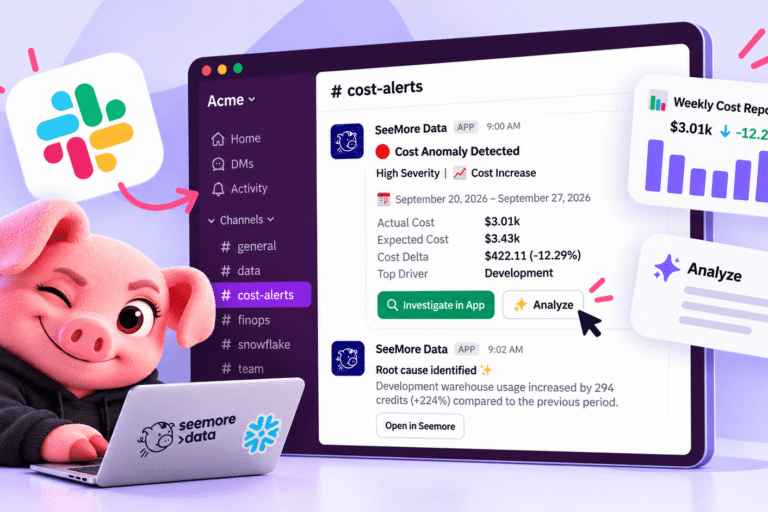
The Seemore Slack app sends your team a daily report on the real state of your account: cost, usage, performance, what’s actually going on, not only the moments something breaks. That distinction matters. A report that only speaks up when something’s wrong trains a team to think of it as bad news. A report that shows up every day with the honest picture, good day or ordinary day, becomes part of how the team thinks day to day, not an occasional interruption.
And because it lands in Slack, it isn’t read alone. It’s read by the whole channel, together, at the same time. Someone reacts, someone else weighs in, and a conversation starts around numbers that used to sit quietly in one person’s tab. That shared moment, every single day, is where a real cost culture actually gets built: not in a policy document, in a running conversation the whole team is part of.
From noticing to understanding, without leaving the conversation
Noticing something is only half of it. The other half is understanding it, and that part usually stalls out because it means going somewhere else, and going somewhere else means it waits, and waiting often means it never happens.
So the report comes with a convenient Analyze button, right there in the thread. Click it, and you get exactly what you need to know about that day’s numbers, and what could be improved, without the conversation ever breaking stride. The moment of curiosity and the moment of getting an answer happen in the same place, seconds apart.
And when something is worth a real deep dive, that same thread carries you straight into Seemore, with the context already in hand, so the investigation picks up exactly where the conversation left off.
Cost awareness is a culture, not a checkpoint
We’d argue the biggest lever in cost management isn’t a sharper anomaly detector, useful as that is. It’s whether your whole team talks about cost, usage, and performance casually and regularly, as a normal part of how they work together, not as something only one person is responsible for noticing.
That’s the idea behind the Seemore Slack app: bring that daily awareness into the room the team already lives in, make it something everyone sees at once, and let the conversation it starts do what a private glance at a number never could. That’s what a genuinely cost-aware organization looks like day to day: not a single owner keeping watch, but a whole team that talks about it, together, as a matter of habit.
Frequently asked questions
What does the Seemore Data daily report actually include?
The full picture of your account – cost, usage, and performance, not only anomalies. You get the same honest read every day, whether or not something went wrong.
How is this different from a Slack alert or notification?
An alert only shows up when something breaks. The daily report shows up every day regardless, so the team builds a habit of checking in on cost and usage as a matter of course, not just when there’s bad news.
What does the Analyze button do?
It gives you a closer look at that day’s report, what’s worth knowing and what could be improved, without leaving the Slack thread or opening a separate tool.
Can I go deeper than what's in Slack?
Yes. When something needs a real investigation, the same thread can carry you into Seemore, with the context already in hand, so you pick up exactly where the conversation left off.
Does it replace our dashboards?
No. The dashboards are still where you go for the complete, on-demand picture of your Snowflake spend. The Slack app is a daily habit layered on top of that, meant to get the whole team talking about cost regularly, not to replace anything you already use.
Do I need to set anything up to use it?
Setup is a webhook connection to your Slack channel, no code required. Once it’s connected, the daily report starts showing up on its own.
Who on the team should be in the channel?
Anyone who should have a stake in the conversation, not just whoever owns the cost dashboard. Part of the point is making cost, usage, and performance a shared conversation instead of one person’s responsibility.