

Short answer. Gen2 standard warehouses run on faster hardware and cost more per hour: 1.35 times the Gen1 credit rate on AWS and GCP, and 1.25 times on Azure. A Gen2 warehouse costs less for a given query only if it finishes that query at least 26% faster on AWS or GCP, or at least 20% faster on Azure. In our own customer test, the p95 query runtime fell 35%, total warehouse uptime did not change, and total cost rose by up to 5% on some days. Test your own workloads before you switch.
Update, October 2026: Gen2 is now available on AWS, Azure and GCP in nearly every region, and it is the default for new standard warehouses. The SQL below uses the GENERATION parameter, which replaced RESOURCE_CONSTRAINT for this setting.
On May 5th, 2025, Snowflake released Generation 2 Standard Warehouses (Gen2) to general availability, an upgrade aimed at improving cost-performance for data-heavy workloads. At Seemore Data, we took it to the field shortly after launch: testing it not in theory, but in live production workloads with our customers.
The early verdict? Snowflake Gen2 warehouse has real potential, but like any optimization effort, results depend on workload characteristics, spillage, and execution patterns.
What is Snowflake Gen2 Warehouse?
Gen2 is not a new warehouse type. It is a new generation of the same STANDARD warehouse. Snowflake describes it as built on faster underlying hardware, with software optimizations such as enhancements to delete, update and merge operations and to table scans. With Gen2 you can expect most queries to finish faster, and you can do more work at the same time. The exact gain depends on your configuration and workload, and Snowflake itself advises testing how much it improves your costs, performance, or both. (Snowflake documentation)
The areas to watch:
- DML performance (MERGE, UPDATE, DELETE). Snowflake reports up to 4.4 times faster execution for applicable DML on a 2XL Gen2 warehouse compared with a 2XL Gen1 warehouse, as of May 2, 2025. (Snowflake engineering blog)
- Table scans.
- Running more work at the same time. Our own test below did not show a concurrency gain, so measure this one yourself.
No SQL changes are needed to your queries.

What’s under the hood?
Snowflake does not publish the internals of Gen2, so we only describe what its documentation states: faster underlying hardware, and software optimizations aimed at delete, update and merge operations and at table scans. For DML, Snowflake’s engineers explain that Gen2 can record a small change as a compact modification record instead of rewriting a whole micro-partition, which cuts the amount of data written. (Snowflake engineering blog)
In short, Gen2 is meant to deliver more work per credit for data pipelines or workloads that strain Gen1. But, and this is important, the cost per node is significantly higher.
What about the cost? (more expensive, but more work done)
Gen2 warehouses use more credits per hour than Gen1 warehouses of the same size. Billing is still per second, with a 60-second minimum each time a warehouse starts or resumes.
| Cloud | Gen2 credits per hour, compared with Gen1 |
|---|---|
| AWS | 1.35x |
| Azure | 1.25x |
| GCP | 1.35x |
A Medium warehouse, for example, uses 4 credits per hour on Gen1, 5.4 on Gen2 on AWS or GCP, and 5 on Gen2 on Azure. (Snowflake Service Consumption Table, Table 1(b), effective October 12, 2026)
So it is important to keep a tight watch on the cost-performance ratio. A query is cheaper on Gen2 only if it runs enough faster to cover the premium:
| Cloud | Gen2 premium | Gen2 must finish at least this much faster |
|---|---|---|
| AWS | 1.35x | 26% |
| Azure | 1.25x | 20% |
| GCP | 1.35x | 26% |
Example (AWS, Large warehouse). A query that runs for 100 seconds on a Gen1 Large (8 credits per hour) uses about 0.222 credits. A Gen2 Large on AWS uses 10.8 credits per hour, so the same query has to finish in under 74 seconds to cost less. At 60 seconds it costs 0.18 credits (19% less). At 85 seconds it costs 0.255 credits (15% more).
The cost-performance ratio tends to be better for complex, long-running queries, for these reasons:
- Faster completion means fewer seconds charged. Snowflake published a MERGE that scanned 483 GB of data. It ran in 5 minutes 17 seconds on Gen1, in 4 minutes 16 seconds on Gen2, and in 1 minute 56 seconds on Gen2 with Snowflake’s DML optimizations. That is about 63% less runtime than Gen1, well past the 20% to 26% needed to cover the premium. Snowflake did not publish the credit cost of that run. (Snowflake engineering blog)
- Potential to downsize. Because Gen2 can finish work faster, you may be able to run a workload on a smaller size (for example, from XLARGE to LARGE) and keep the same performance. Only a test on your own workload can tell.
Region and cloud availability
Gen2 is generally available on AWS, Azure and Google Cloud (GCP), in all regions except a short list. Snowflake currently lists these exceptions: AWS Europe (Zurich), AWS Africa (Cape Town), GCP Middle East Central2 (Dammam), and the Azure US Government Virginia regions. It is also not available in regions in China. Check Snowflake’s current list before you plan around it.
It is now the default. Since Snowflake’s 2026_03 behavior change, every new standard warehouse created without a GENERATION value is a Gen2 warehouse in regions where Gen2 is available. (Before that, the default depended on the region and on when your organization was created.) Existing Gen1 warehouses stay Gen1 until you change them, and warehouses created at X5LARGE or X6LARGE are Gen1. So a plain CREATE WAREHOUSE now bills at the Gen2 rate. (Snowflake release note, BCR-2250)
Mind your DR setup. If you replicate warehouses and create any Gen2 warehouses, every secondary region must also support Gen2. Otherwise the Gen2 warehouses might not resume after a failover.
Use this to confirm your current region:
SELECT CURRENT_REGION();How to use it: no magic, just SQL
Create a brand-new Gen2 warehouse
CREATE OR REPLACE WAREHOUSE etl_pipeline_gen2
  WAREHOUSE_SIZE = MEDIUM
  GENERATION = '2'
  AUTO_SUSPEND = 60
  INITIALLY_SUSPENDED = TRUE
  AUTO_RESUME = TRUE;
Migrate an existing Gen1 warehouse
ALTER WAREHOUSE daily_batch_wh SUSPEND;
ALTER WAREHOUSE daily_batch_wh SET GENERATION = '2';
ALTER WAREHOUSE daily_batch_wh RESUME;
Why suspend first? You can convert a running warehouse, but queries already running finish on the Gen1 compute while new queries start on Gen2, and you are charged for both sets of compute until the old queries complete. Converting while the warehouse is suspended and idle avoids that. (Snowflake documentation)
Use GENERATION, not RESOURCE_CONSTRAINT. An earlier version of this article used RESOURCE_CONSTRAINT = STANDARD_GEN_2. Since Snowflake’s 2026_02 behavior change, a statement that sets STANDARD_GEN_1 or STANDARD_GEN_2 fails with an error similar to “Cannot set resource constraint to ‘STANDARD_GEN_2’. Use the GENERATION property to set warehouse hardware generation.” (Some other pages in Snowflake’s documentation still show the older syntax.) The quotes around the number are required. To see which generation a warehouse is on, run SHOW WAREHOUSES and read the generation column. (Snowflake release note, BCR-2225)
Important: Gen2 is not available for X5LARGE or X6LARGE, so the largest Gen2 size is 4X-LARGE. If you run a 5X-Large or 6X-Large warehouse, test the workload on a smaller Gen2 size first. It cannot be converted in place.
Real-life use case: Gen1 vs Gen2
The real challenge is assessing whether a warehouse type can be changed and what the impact will be. A warehouse usually runs multiple types of workloads. Some workloads may be affected and others may not.
Just to test things out, one of our customers at Seemore Data changed their Gen1 warehouse to a Gen2.
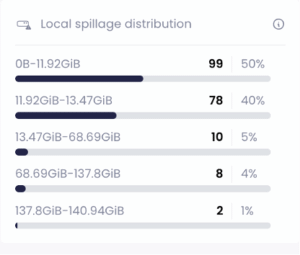
The idea behind choosing this warehouse was that it seemed to be an optimal fit because this was a warehouse that ran a lot of heavy queries with merges and a “not so great” spillage distribution.
Local spillage distribution before the change:
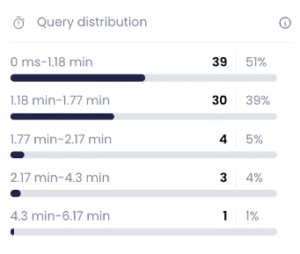
We expected to see a significant change in query runtime distribution and therefore a change in warehouse uptime distribution. Unfortunately this was not the case. Although a slight runtime improvement was seen in some of the queries, the distribution stayed more or less the same and so did the warehouse uptime:
Query runtime distribution before the change:
Query runtime distribution after the change:
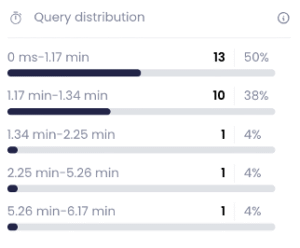
To our surprise there was no improvement in concurrency handling, but queued queries were not a major concern in this case.
Where the changes were significant was the improvement in the p95 query runtime duration from 1.78 to 1.16, lowering the runtime by 35%.
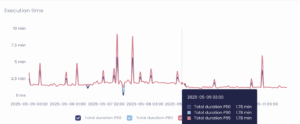
This warehouse still needs to be monitored as some results show that although the p95 queries ran faster with no significant overall change, some days do show an overall rise in total costs of up to 5%.
Impact summary:
- P95 runtime improved: 35% reduction, from 1.78s to 1.16s
- Overall warehouse uptime: no significant change
- Daily cost volatility: some days showed up to a 5% increase in credits consumed
- Query runtime distribution: slight improvements, but not enough to shift the cost curve meaningfully in aggregate
Pro tips for a smooth transition
- Benchmark first. Create a second warehouse of the same size as the Gen1 one, set
GENERATION = '2', run the same jobs on both, and compare query history. Snowflake’sCLONEcommand covers databases, schemas, tables and a few other objects but not warehouses, so build the test copy by hand. - Compare like with like on Query Acceleration. On Enterprise Edition and above, a new Gen2 warehouse is created with the Query Acceleration Service (QAS) switched on by default, and QAS credits are billed separately from warehouse credits. Converting an existing Gen1 warehouse does not switch QAS on. If you compare a new Gen2 warehouse with an old Gen1 one, either add the QAS credits to the Gen2 side or switch QAS off for the test. (Snowflake documentation, QAS billing)
- Watch costs with WAREHOUSE_METERING_HISTORY. Don’t just look at runtime: track actual credit use. The view can lag by up to three hours.
SELECT warehouse_name,
       DATE_TRUNC('day', start_time) AS usage_day,
       SUM(credits_used_compute)     AS compute_credits
FROM SNOWFLAKE.ACCOUNT_USAGE.WAREHOUSE_METERING_HISTORY
WHERE warehouse_name = 'DAILY_BATCH_WH'
  AND start_time >= DATEADD('day', -30, CURRENT_TIMESTAMP())
GROUP BY ALL
ORDER BY usage_day;- Convert while the warehouse is suspended to avoid paying for Gen1 and Gen2 compute at the same time (see above).
Where to go next
We have since published a guide that sorts queries into clear Gen2 winners, queries that gain nothing, and queries to test first: Gen1 vs Gen2: when does the premium pay off?
Ready to maximize your Snowflake investment? click here for a free assessment or start your 14-day trial today.