Snowflake Cortex Analyst Guide: Text-to-SQL, Semantic Views, Query History, and Monitoring
Want Cortex observability across your Snowflake data?


Snowflake Cortex Analyst can make text-to-SQL look simple. A user asks a question. Snowflake generates SQL, runs it, and returns an answer.
Production environments are more demanding. Every request still depends on business definitions, semantic coverage, warehouse cost, access controls, and the way your team monitors each generated Snowflake query.
Snowflake’s own documentation points to the same conclusion. The semantic layer and the monitoring stack determine whether Cortex Analyst feels stable or unreliable over time.
TL;DR
Snowflake Cortex Analyst is a fully managed text-to-SQL feature for structured data in Snowflake. Teams can embed it through the REST API in custom applications and chat experiences.
Semantic Views are now Snowflake’s recommended method for Cortex Analyst. They store business metrics, relationships, and definitions directly inside Snowflake. Legacy YAML semantic model files still work, but Snowflake directs new implementations toward Semantic Views.
Cortex Analyst pricing is message-based. The generated SQL still runs on your Snowflake virtual warehouse. Because of this, teams must monitor both Analyst usage and warehouse activity.
Snowflake gives you several ways to monitor usage, including CORTEX_ANALYST_USAGE_HISTORY, request logs in the LOCAL schema, and Snowflake query history. Production teams should use all three.
Contents
- What Snowflake Cortex Analyst does
- How text to SQL works in Snowflake
- Why Semantic Views matter more than the model
- Pricing and cost behavior
- Monitoring with Snowflake query history
- Access control and governance
- How to keep Cortex Analyst from going off track
- Meet Seemore Data Assistant
What Snowflake Cortex Analyst does
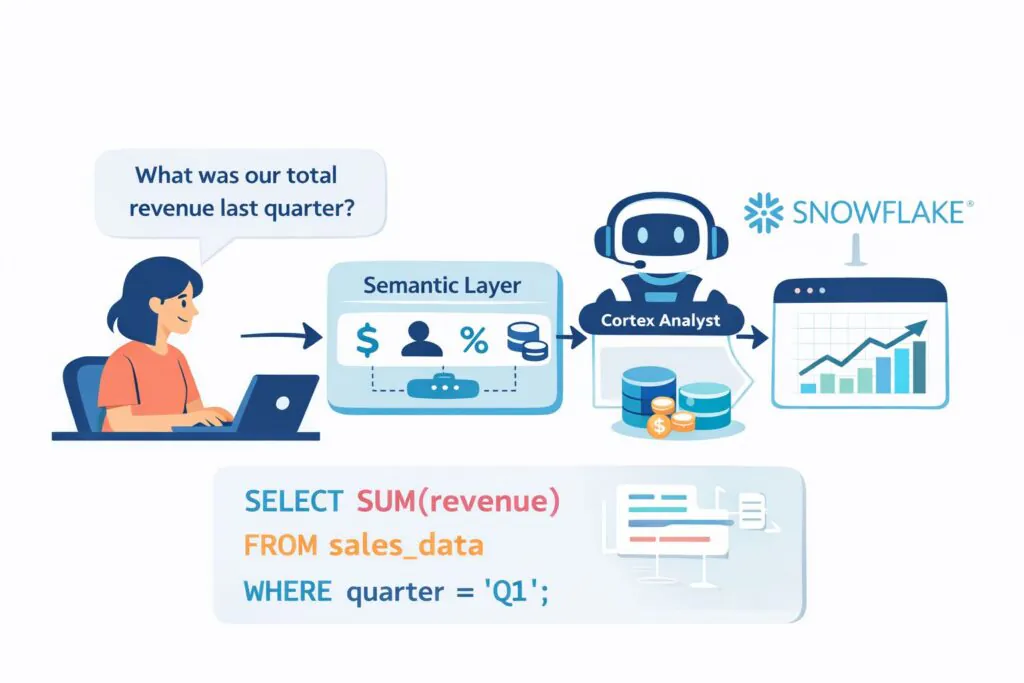
Snowflake describes Cortex Analyst as a fully managed capability for structured data. Business users can ask questions in natural language and receive answers without writing SQL.
The feature is available through a REST API. The API supports multi-turn conversations, and responses may contain text, suggestions, and SQL blocks.
Under the hood, Cortex Analyst receives a user question together with a semantic model or a semantic view. It then generates the SQL required to answer the question.
The REST API can accept more than one model in a request. When that happens, Cortex Analyst selects the model it considers the best match.
Every response still becomes a Snowflake query. Snowflake states that the generated SQL executes inside your Snowflake virtual warehouse. In practice, this means the text-to-SQL layer runs directly on top of your Snowflake data warehouse rather than through a separate chat layer.
How text to SQL works in Snowflake
Snowflake now emphasizes Semantic Views for Cortex Analyst.
A semantic view is a schema-level object that stores business concepts directly in the database. These concepts include entities, metrics, and relationships. Snowflake also allows semantic views to appear in a SELECT statement.
Snowflake recommends Semantic Views for Cortex Analyst because they support native RBAC, sharing, derived metrics, access modifiers, and custom instructions. Legacy YAML semantic model files remain available for compatibility, but new projects are expected to move toward Semantic Views.
Teams can create Semantic Views in several ways:
- SQL commands such as CREATE SEMANTIC VIEW
- A guided workflow in Snowsight
- YAML specifications
- Conversion from YAML through a stored procedure
The Semantic View Editor in Snowsight also allows teams to add relationships, verified queries, synonyms, descriptions, and custom instructions.
Snowflake’s Routing Mode shows how the system evaluates text-to-SQL quality. Cortex Analyst first attempts to generate semantic SQL using SEMANTIC_VIEW(…). If the semantic view cannot answer the question within the timeout, the system falls back to standard SQL on physical tables.
Snowflake reports that semantic SQL appears in roughly 10 percent of queries overall. The percentage varies depending on how complete the semantic layer is.
In practice, a stronger semantic layer increases the share of questions answered within governed business definitions.
Why Semantic Views matter more than the model
Snowflake documentation explains that Semantic Views improve Cortex Analyst accuracy and reliability. They do this by providing richer metadata, metric definitions, predefined join paths, and verified examples.
Descriptions, synonyms, and data types help the model interpret the structure of your data. Metrics and relationships define how aggregation and joins should behave according to business rules.
Custom instructions provide another control layer. Snowflake allows teams to define rules in YAML that guide SQL generation. For example, a rule can define the meaning of a “financial year,” specify how percentages should appear, or apply a default date filter when the user does not include one.
Verified queries also play an important role. Snowflake’s Verified Query Repository stores approved question-and-SQL pairs. When a user question resembles one of those entries, Cortex Analyst can reference it during SQL generation. Snowflake may also suggest verified queries based on user behavior.
Snowsight’s generator already uses query history and example SQL to help build better views. Snowflake notes that the generator can extract tables, columns, and relationships from example SQL. It can also use the query history available to the creating role to recommend relationships and verified queries.
Snowflake provides practical guardrails for view design. In the Snowsight workflow, Snowflake suggests using no more than ten tables and no more than fifty selected columns. The broader best-practices guide suggests roughly fifty to one hundred total columns across tables for optimal performance. This guideline reflects context-window limits in AI components such as Cortex Analyst.
Pricing and cost behavior
Cortex Analyst pricing is based on the number of processed messages, according to the Snowflake Service Consumption Table.
Only successful HTTP 200 responses count toward usage. Token counts do not affect Cortex Analyst pricing in the standard Analyst path. Tokens only influence cost when Cortex Analyst is invoked through Cortex Agents.
Learn more about tracking token-level costs.
Warehouse compute is billed separately. Snowflake explains that generated SQL runs inside your Snowflake virtual warehouse. As a result, teams usually track Cortex Analyst cost in two layers:
- Analyst message credits
- Standard warehouse compute
Snowflake exposes Analyst usage through SNOWFLAKE.ACCOUNT_USAGE.CORTEX_ANALYST_USAGE_HISTORY. This view aggregates credits hourly and includes fields such as START_TIME, END_TIME, REQUEST_COUNT, CREDITS, and USERNAME.
Snowflake also records Analyst usage in METERING_HISTORY with the service type AI_SERVICES.
A simple daily rollup query looks like this:
SELECT
DATE_TRUNC(‘day’, START_TIME) AS usage_day,
SUM(REQUEST_COUNT) AS analyst_requests,
SUM(CREDITS) AS analyst_credits
FROM SNOWFLAKE.ACCOUNT_USAGE.CORTEX_ANALYST_USAGE_HISTORY
WHERE START_TIME >= DATEADD(‘day’, -30, CURRENT_TIMESTAMP())
GROUP BY 1
ORDER BY 1 DESC;
The query uses the documented hourly Analyst usage fields that Snowflake exposes in ACCOUNT_USAGE.

Monitoring Cortex Analyst with Snowflake query history
Snowflake gives admins a second layer of data monitoring beyond cost rollups. Cortex Analyst request logs include the user question, generated SQL, errors or warnings, request and response bodies, and other metadata. Snowflake says the logs appear in the Monitoring tab for a semantic view and can also be queried directly from the SNOWFLAKE.LOCAL.CORTEX_ANALYST_REQUESTS table function, usually within one to two minutes.
A direct log query looks like this:
SELECT *
FROM SNOWFLAKE.LOCAL.CORTEX_ANALYST_REQUESTS_V
WHERE
SEMANTIC_MODEL_TYPE IN (‘SEMANTIC_VIEW’) AND
SEMANTIC_MODEL_NAME IN (‘PROD_NIAGARA_DB.PUBLIC.UNIFIED_QUERY_SEMVIEW’);
Snowflake documents that the table function serves as the SQL path for request logs associated with a specific semantic model or view.
For broader admin access, Snowflake also exposes SNOWFLAKE.LOCAL.CORTEX_ANALYST_REQUESTS_V. Access to that view requires either the SNOWFLAKE.CORTEX_ANALYST_REQUESTS_VIEWER or SNOWFLAKE.CORTEX_ANALYST_REQUESTS_ADMIN role.
And you still need classic Snowflake query history. Snowflake’s ACCOUNT_USAGE.The QUERY_HISTORY view retains a one-year history and encompasses dimensions such as user, warehouse, and time range. Snowflake also notes that the Information Schema QUERY_HISTORY table function only covers the last seven days.
A practical monitoring query can look for semantic SQL and long-running requests:
SELECT
start_time,
user_name,
warehouse_name,
query_text,
total_elapsed_time,
bytes_scanned,
execution_status
FROM SNOWFLAKE.ACCOUNT_USAGE.QUERY_HISTORY
WHERE start_time >= DATEADD(‘day’, -7, CURRENT_TIMESTAMP())
AND query_text ILIKE ‘%SEMANTIC_VIEW(%’
ORDER BY start_time DESC;
Snowflake documents all of those fields in QUERY_HISTORY, including query_text, user_name, warehouse_name, start_time, total_elapsed_time, bytes_scanned, and execution_status.
Production teams should use all three layers together. CORTEX_ANALYST_USAGE_HISTORY answers “how much did Analyst cost,” request logs answer “what did users ask and what SQL did Analyst generate,” and QUERY_HISTORY answers “what happened on the warehouse.”
Access control and governance
Governance has changed slightly from the earlier Cortex rollout, and the current documentation is relevant here. To make requests to Cortex Analyst, Snowflake says you can use either SNOWFLAKE.CORTEX_USER or SNOWFLAKE.CORTEX_ANALYST_USER. CORTEX_USER covers all covered AI features, while CORTEX_ANALYST_USER limits access to Cortex Analyst.
Snowflake also says CORTEX_USER is granted to PUBLIC by default, which means broader AI access can sprawl if you do nothing. But Snowflake treats Cortex Analyst more narrowly at the feature level: the opt-out guide says Cortex Analyst is an opt-in feature that is not accessible to users by default, and the feature can be disabled account-wide with ENABLE_CORTEX_ANALYST = FALSE.
For selective Analyst access, Snowflake recommends granting SNOWFLAKE.CORTEX_ANALYST_USER to a custom role. If a user role already has CORTEX_USER, Snowflake says you must revoke that broader role first before you rely on the narrower Analyst role.
Semantic model storage also affects governance. Snowflake notes that if you store legacy YAML models on a stage, any role with access to that stage can access those models, even if the role does not have access to the tables behind them. And for native Semantic Views, Snowflake says users only need SELECT on the semantic view itself to query it, not SELECT on the underlying tables.
How to keep Cortex Analyst from going off track
Step 1: Start with one narrow subject area
Don’t point Cortex Analyst at your whole Snowflake environment and hope it sorts things out.
Pick one domain, one clear use case, and one star-like model. Sales performance, subscription revenue, or support tickets all work better than a giant semantic layer that tries to answer everything at once.
Step 2: Lock down your business definitions early
Cortex Analyst struggles when the business language is vague.
If a user asks for “margin,” the semantic layer must know exactly what that means. Gross or net. Which filters apply? Which tables matter? The more room you leave for interpretation, the more likely you’ll get SQL that looks plausible but answers the wrong question.
Step 3: Reduce join complexity before you expose the model
Text to SQL becomes unstable when the answer depends on lengthy join chains spanning multiple tables.
Keep the first version close to a clean analytical model. If the query path depends on messy relationships, hidden edge cases, or multiple grains, simplify that logic before you ask Cortex Analyst to generate SQL on top of it.
Step 4: Keep semi-structured fields and odd data types out of the first rollout
VARIANT columns, nested JSON, and unusual field types add friction fast.
For the first release, flatten or normalize the data you know people will ask about most. Clean inputs give Cortex Analyst a significantly better chance of producing useful SQL.
Step 5: Add synonyms and descriptions aggressively
Business users rarely speak in table names and column names.
Teach the semantic layer the language your company actually uses. Add synonyms, metric descriptions, and plain-English context so “revenue,” “ARR,” “active customer,” and similar terms map cleanly to the right logic.
Step 6: Build a small golden set of verified questions
Treat your semantic layer like something you test, not something you publish once and forget.
Create a short list of known-good business questions and verify the SQL and results regularly. A small golden set acts like CI for semantics. It helps you catch drift before users do.
Step 7: Review real usage and tighten the layer over time
Once people start using Cortex Analyst, patterns show up quickly.
You’ll see which questions work, which ones break, and where definitions still feel loose. That is also where end-to-end observability starts to matter, because teams need to connect generated SQL, usage, and cost across the stack, not only inside one query surface.
Meet Seemore Data Assistant
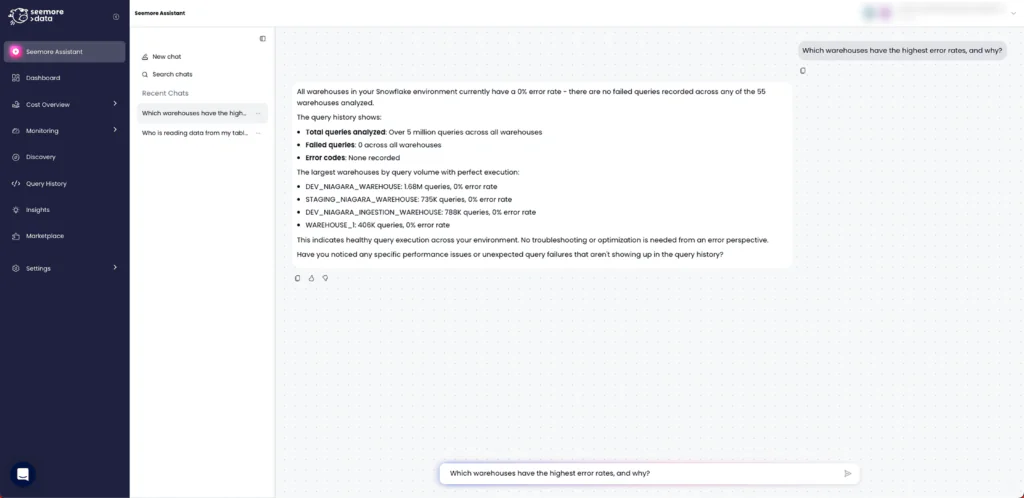
For Seemore readers, the interesting question is not whether Cortex Analyst can generate SQL. The bigger question is whether your team can understand what happened, what changed, and why, without burning time on manual investigation.
That is where Seemore Assistant changes the experience. It connects Snowflake Analyst to Seemore’s mapping and orchestration engines, so answers come with more operational context around your data assets, especially usage, lineage, and cost. Instead of stopping at query generation, the assistant helps teams go deeper into root cause analysis, explore the right tables and relationships, and move faster from question to action.
The value is not limited to one workflow. You can ask Seemore Assistant a wide range of data and business questions in natural language, including executive-level questions that need deeper context, not just raw SQL. It is built for repeated use too, with chat history and saved favorite conversations that make recurring questions easier to revisit.
So once Cortex Analyst moves from demo to production, Seemore’s role becomes much clearer. It is not just about generating answers. It is about giving teams full observability across their data, along with the context they need to trust the answer and understand the business impact behind it.
FAQ
What is Snowflake Cortex Analyst?
Snowflake Cortex Analyst is a fully managed feature for structured data in Snowflake that lets users ask questions in natural language and receive answers without writing SQL. Snowflake exposes it through a REST API, and the API supports multi-turn conversations.
Do Semantic Views replace legacy YAML semantic models?
Not completely. Snowflake still supports legacy YAML semantic model files for backward compatibility. But Snowflake recommends Semantic Views for new work because they bring native integration, RBAC, sharing, and richer semantic features for Cortex Analyst.
How do I monitor Snowflake query history for Cortex Analyst?
Use at least three layers. CORTEX_ANALYST_USAGE_HISTORY tracks Analyst credits and request counts, request logs capture the user question and generated SQL, and ACCOUNT_USAGE.QUERY_HISTORY lets you inspect the resulting Snowflake query across user, warehouse, timing, and scan behavior.
Does Cortex Analyst cost scale with tokens?
Usually no. Snowflake says normal Cortex Analyst pricing is message-based and counts only successful HTTP 200 responses. Token count only affects cost when Cortex Analyst is invoked through Cortex Agents. The warehouse query still carries its own compute bill.
Which roles control access to Cortex Analyst?
Snowflake documents two main choices: SNOWFLAKE.CORTEX_USER and SNOWFLAKE.CORTEX_ANALYST_USER. The narrower CORTEX_ANALYST_USER role gives access only to Cortex Analyst, and Snowflake recommends revoking CORTEX_USER first if you want true selective access.