Managing Snowflake warehouses efficiently has always been a delicate balance. You need compute resources available when your data teams need them, but leaving warehouses running when idle can drain budgets fast. Traditional Snowflake Auto Suspend features help, but they rely on static timers that don’t adapt to your actual usage patterns. That’s where intelligent automation changes everything.
The Hidden Cost of Static Snowflake Auto Suspend
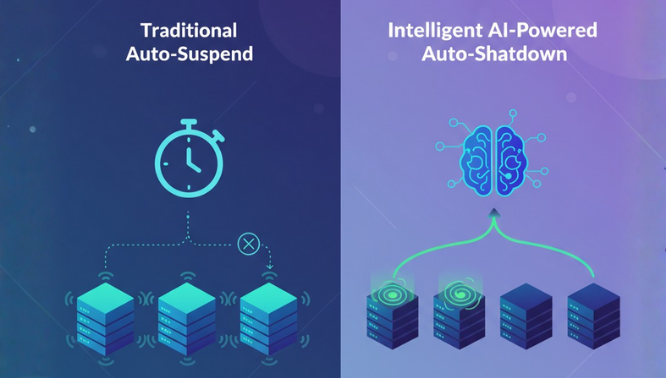
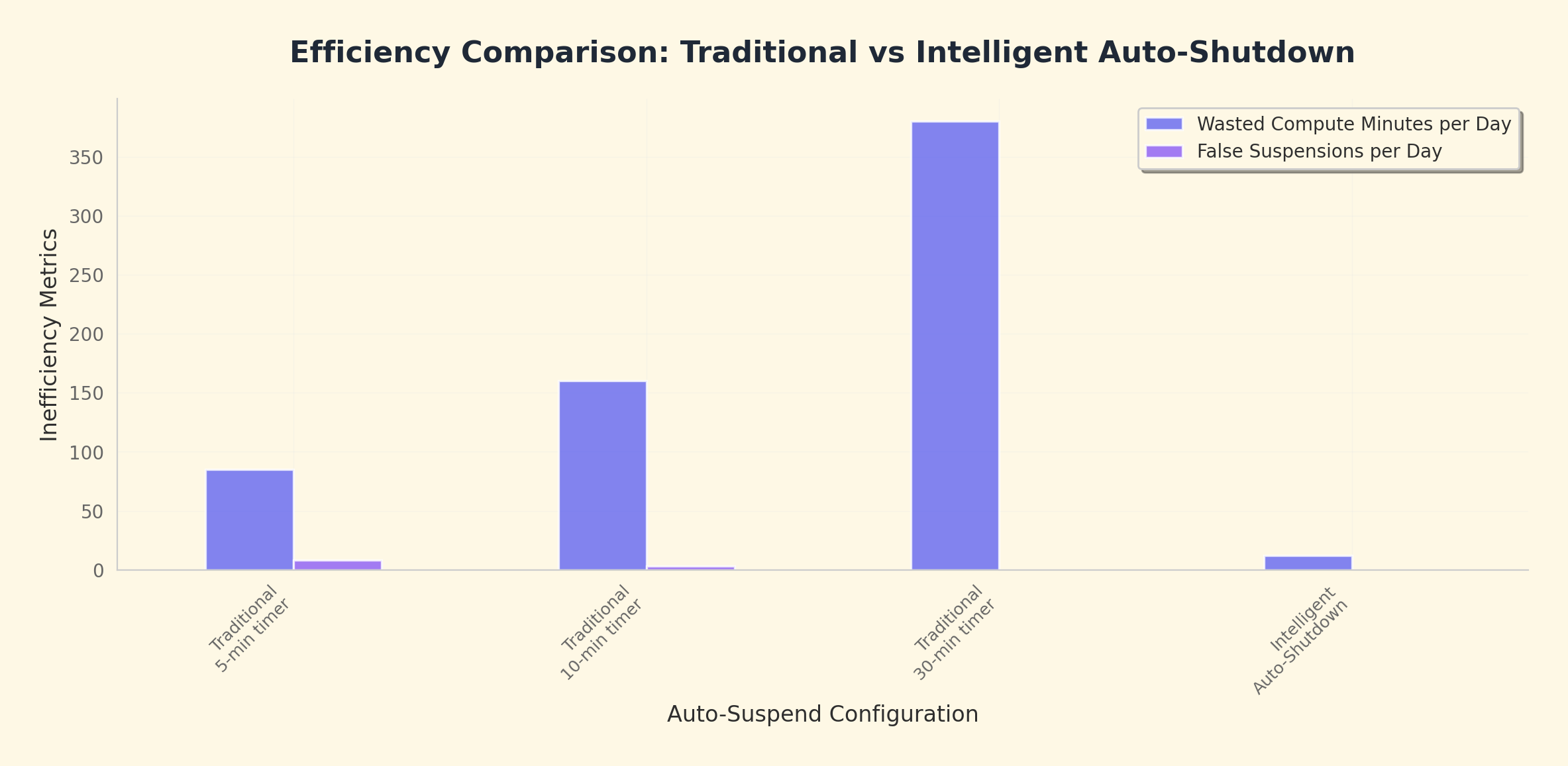
While Snowflake auto suspend is enabled by default, most organizations set conservative timers-often 5-10 minutes-to balance availability and cost. But here’s the problem: static configurations can’t distinguish between a warehouse that’s genuinely needed versus one that was simply forgotten after a one-time analysis.
The result? Organizations often face two painful scenarios:
- Conservative timers (shorter suspend times) lead to frequent warehouse restarts, impacting query performance
- Lenient timers (longer suspend times) result in warehouses burning credits while sitting completely idle
Neither option is optimal, and both require constant manual monitoring and adjustment.
Enter Intelligent Warehouse Auto-Shutdown
Seemore Data introduces a fundamentally smarter approach to warehouse management through intelligent automation powered by AI. Unlike traditional auto-suspend that follows rigid rules, Auto Shutdown continuously learns and adapts to your organization’s actual usage patterns.
How Intelligent Auto-Shutdown Works
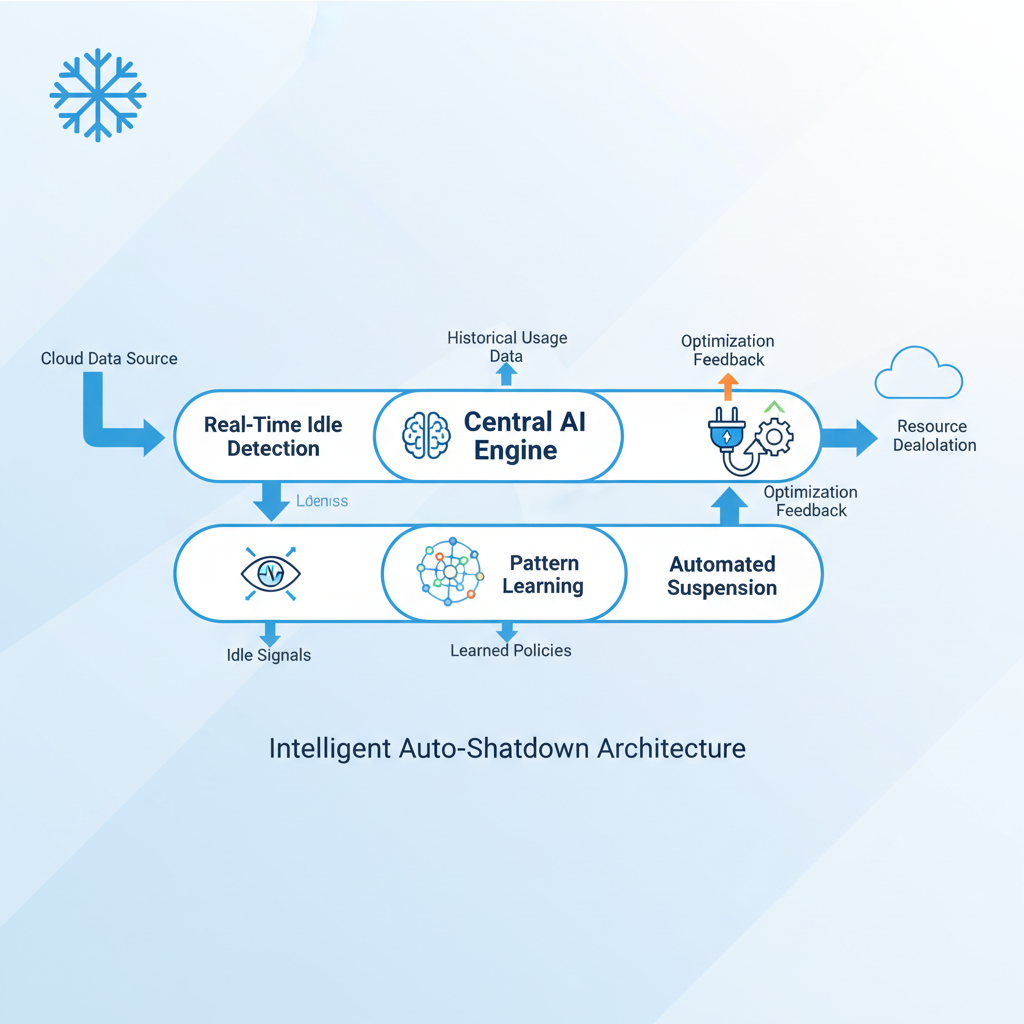
Seemore enhanced automation delivers three critical capabilities:
- Real-Time Dynamic Idle Warehouse Detection
The system doesn’t just wait for a timer to expire. Instead, it actively monitors warehouse activity patterns in real-time, understanding the difference between a temporary pause in queries and genuine idle time. By analyzing historical patterns and current context, Auto Shutdown can confidently identify warehouses that are truly unused and initiate shutdown immediately-no waiting, no wasted credits.
- Enhanced Auto-Suspend Mechanism
Beyond simple idle detection, Auto Shutdown optimizes the timing of warehouse suspension for maximum efficiency. The system considers factors like:
- Query execution patterns throughout the day
- Typical workload schedules
- Historical restart patterns
- Business-critical processes
This contextual understanding ensures warehouses are available when needed but suspended the moment they’re not-achieving what Snowflake’s cost optimization guide recommends: per-second billing optimization taken to its logical conclusion.
- Zero Manual Intervention
Perhaps the most powerful feature: the system is completely autonomous. Once deployed, Auto Shutdown learns and adapts to your usage patterns automatically. No manual configuration tweaks. No constant monitoring. No scheduled reviews to adjust suspend timers. The AI continuously refines its understanding of your workload patterns, making smarter decisions over time.
The Financial Impact: Beyond Standard Optimization
Traditional warehouse optimization-right-sizing, basic auto-suspend, and manual monitoring-typically delivers 20%-30% cost savings for Snowflake environments. Organizations like Verbit and Artlist have realized these impressive savings using Seemore Data’s platform.
Intelligent auto-shutdown adds an additional layer of savings beyond the baseline, with the potential to deliver a further 10–15% cost reduction for the specified asset.t By eliminating the “forgotten warehouse” problem and the inefficiencies of static timers, organizations can push savings even higher.
The system specifically targets:
- Idle development warehouses left running after analysis sessions
- Test environments that run continuously despite sporadic usage
- One-off analytical workloads that complete but leave warehouses active
- Misconfigured warehouses with overly conservative suspend settings
How It Compares to Snowflake’s Native Features
Snowflake provides robust warehouse management capabilities, including multi-cluster warehouses and resource monitors. These are powerful tools, but they require expertise to configure optimally and constant attention to maintain.
Seemore’s Auto shutdown doesn’t replace Snowflake’s features-it enhances them. Think of it as an automatic, self-adjusting dimmer switch for your warehouse resources: rather than requiring someone to manually turn off unused lights (warehouses) or set complicated timers, the system observes exactly which rooms are empty and dims or shuts them down immediately and efficiently.
Seemore Data: Redefining Warehouse Efficiency
Seemore Data is the proactive and automated data efficiency platform that helps data teams go beyond cost control to achieve full-stack optimization.
By combining real-time observability, deep lineage, automated warehouse optimization, and AI-powered recommendations, Seemore empowers teams to slash data costs by up to 50% and reduce maintenance time by 20%.
Want to Seemore in action? Book a meeting with our data expert for a quick demonstration of how much you can save.

Frequently asked questions
What is Snowflake auto suspend?
Snowflake auto suspend automatically suspends a warehouse after a fixed period of inactivity, defined by a static time-based threshold (for example, 5 or 10 minutes).
Why is Snowflake auto suspend inefficient for real-world workloads?
Because it relies on static timers, it can’t distinguish between brief query gaps and true inactivity, resulting in unnecessary restarts or wasted compute credits.
What happens if Snowflake auto suspend is set too aggressively?
Overly short suspend times increase warehouse resume events, adding latency, degrading query performance, and interrupting user workflows.
What happens if Snowflake auto suspend is set too conservatively?
Long suspend times allow warehouses to run idle, consuming credits without active queries—most commonly in development and test environments.
What is intelligent auto-shutdown in Snowflake environments?
Intelligent auto-shutdown dynamically suspends warehouses based on real-time usage patterns rather than fixed timers, shutting them down as soon as they are truly idle.
How does Auto Shutdown differ from Snowflake’s native auto suspend?
Auto Shutdown uses historical and real-time query behavior to make context-aware shutdown decisions instead of waiting for a predefined suspend timeout.
Does intelligent auto-shutdown replace Snowflake auto suspend?
No. It enhances Snowflake’s native suspend and resume mechanisms by optimizing when auto suspend is triggered.
Which Snowflake warehouses benefit most from intelligent auto-shutdown?
Low-duty-cycle warehouses—such as development, testing, ad-hoc analytics, and one-off workloads—see the largest savings due to frequent idle periods.